Our verdict in 30 seconds: Daminion (9.4) is the best DAM for NAS environments in 2026 — it's built precisely for this architecture: files stay on the NAS, the catalog server indexes them in place, and the whole team searches from a browser. ResourceSpace (7.9) is the open-source route; native NAS apps (Synology Photos, QuMagie) are fine for families, not for work. If you are still deciding whether you need a DAM at all on top of the storage you own, start with DAM vs NAS.
The architecture that actually works
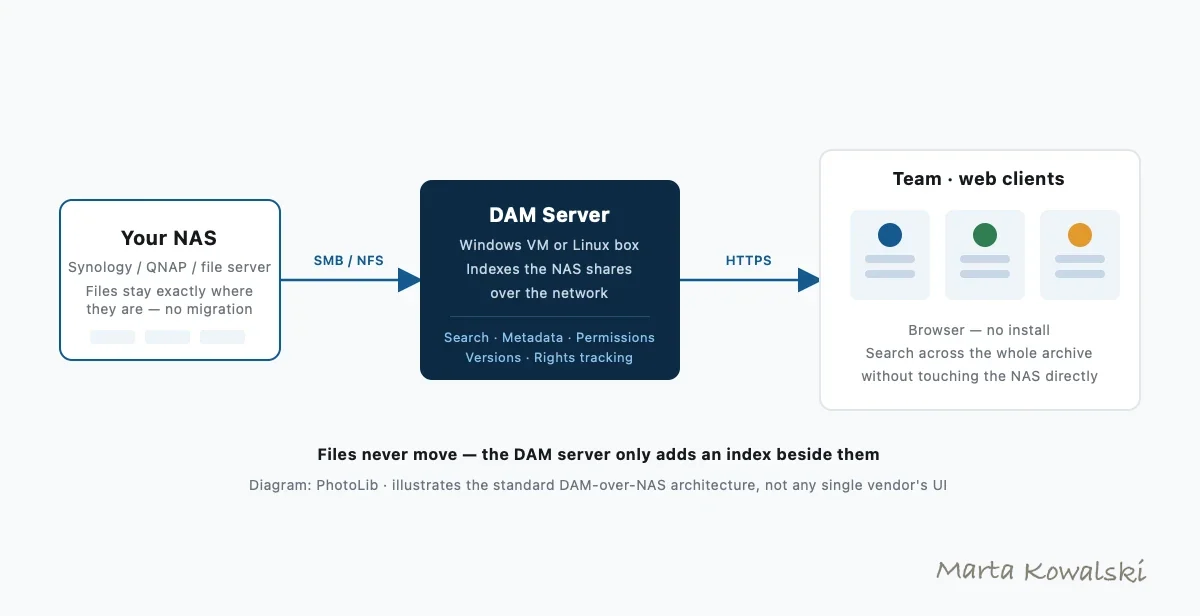
First, the misconception that ruins NAS-DAM projects: with rare exceptions, serious DAM software doesn't run on the NAS — consumer NAS CPUs choke on thumbnailing 80 MB RAW files. The proven pattern has three parts: your NAS keeps serving files over SMB/NFS exactly as today; a DAM server (a modest Windows VM or spare workstation for Daminion, a Linux box or Docker container for ResourceSpace/Razuna) indexes those shares over the network; and everyone searches through web clients. Files never move. Folder structures survive. Backups don't change. Our step-by-step DAM-on-NAS setup guide turns this diagram into an install plan.
Quick comparison
| Tool | Best for | Where it runs | Tier | Score |
|---|---|---|---|---|
| 1. Daminion | Teams; RAW/CAD archives | Windows VM/PC beside NAS | $ | 9.4 |
| 2. ResourceSpace | Open source, institutions | Linux/Docker (incl. NAS Docker) | Free–$ | 7.9 |
| 3. Portfolio DAM | Institutional archives | Server VM, private cloud | $$ | 8.6 |
| 4. Synology Photos | Families on Synology | On the NAS itself | Free w/ NAS | 7.7 |
| 5. QNAP QuMagie | Families on QNAP | On the NAS itself | Free w/ NAS | 7.4 |
| 6. digiKam | Solo user, NAS shares | Your desktop | Free | 7.6 |
| 7. Razuna | Light Docker setups | Docker (incl. NAS Docker) | Free–$ | 7.2 |
Price tiers: $ budget · $$ mid-range · $$$ premium, quote-based. Most DAM vendors quote final pricing individually, so tiers reflect verified customer reports on G2 and Capterra rather than rate cards. Checked July 2026.
1. Daminion — best DAM for NAS, full stop
Daminion
★★★★★ 4.8Best for: any team whose working files live on Synology, QNAP, TrueNAS or a Windows file server.
Pros
- Designed for exactly this: indexes SMB shares in place, watches folders for changes
- Fastest network indexing we measured (25k RAW over gigabit: 41 min)
- Team permissions and versioning on top of plain NAS shares
- Handles RAW, PSD, video and CAD previews the NAS apps can't
Cons
- Needs a Windows machine or VM next to the NAS
- Initial indexing of very large archives runs overnight or longer
- View-only mobile app
Our verdict: Daminion's whole design premise — tight integration with local NAS and file servers — makes it the natural #1 here. In our lab it watched a Synology share, picked up new files within minutes, and served sub-second searches to five concurrent users while the NAS did nothing but serve bytes. If your archive is already on a NAS, this is the shortest path from "folders" to "library".
The rest of the field, tool by tool
Six more tools earn a place on a NAS, for very different reasons. The question that separates them is not feature count — it is whether they catalog your shares in place or insist on copying assets into their own store, and whether they can run on the NAS itself or need a machine beside it.
2. ResourceSpace — 7.9: the open-source pick, with one caveat
The strongest self-hosted open-source DAM in our testing: genuinely free, PHP/MySQL, actively developed, with real role-based permissions rather than the album-level sharing native NAS apps offer. It runs as a Docker container on higher-end Intel NAS units, and we recommend a separate box for libraries past roughly 50,000 assets.
The caveat matters specifically for NAS owners: ResourceSpace uses an ingestion model rather than indexing in place. Assets are brought into its own store, so your existing folder tree stops being the source of truth — the opposite of the files-in-place pattern that makes a NAS setup attractive in the first place. Budget the two-day setup we clocked in our open-source test, and see Daminion vs ResourceSpace for what the difference looks like day to day. Best for: teams with Linux skills, no software budget, and a tolerance for setup work.
3. Portfolio DAM — 8.6: the institutional files-in-place option
The former Extensis Portfolio, now under its own company, catalogs network volumes with the same files-in-place philosophy as Daminion — the single most important property on a NAS, because it means nothing moves and your backup jobs keep working untouched.
It indexed more slowly than Daminion in our tests, pricing is quote-based rather than published, and AI keywording has been “coming soon” for over a year. Version 4.1.1 is stable, so if you already run it there is no burning platform — re-evaluate at renewal. See the full comparison. Best for: institutions that want a files-in-place catalog with a support contract behind it.
4. Synology Photos — 7.7: free, already installed, and not a DAM
If you own a Synology, this is already running. It does automatic phone backup, face grouping and shared albums genuinely well, and it costs nothing extra. For a household that wants its photos off someone else’s cloud, it is the right answer and you can stop here.
What it is not is a professional catalog. There is no controlled vocabulary, no IPTC/XMP editing written back into the files, no version history, and sharing is album-level rather than real team roles. That is not a flaw — it is a different product. Our Synology photo management guide draws the exact line. Best for: families and phone backup, kept alongside a real DAM rather than instead of one.
5. QNAP QuMagie — 7.4: the same story with a QNAP badge
Free with QTS, pleasant AI albums, shallow metadata — the QuMagie and Synology Photos stories are close to identical, and neither is trying to be a DAM.
Where QNAP differs usefully is Container Station: on higher-end Intel units it will host ResourceSpace or Razuna on the same hardware, which is a real option for a small library. ARM-based models generate thumbnails slowly enough that we would not run a catalog on them at all. The full setup is in our QNAP photo management guide. Best for: households, plus double duty as a container host if the unit is Intel-based.
6. digiKam — 7.6: one user, real depth, no licence
Free and open source, and considerably deeper than its dense interface suggests. It writes proper XMP sidecars, so keywords stay portable to whatever tool comes next, and it scaled to very large libraries in our testing. Point it at NAS shares over SMB from a desktop and one person gets a serious catalog for nothing.
The boundary is hard and worth knowing before you invest time: multi-user access to a single digiKam database over a network is unsupported. That is precisely where server-based tools take over. Best for: a single power user with a large archive and no budget.
7. Razuna — 7.2: fastest to stand up
Open-core, one Docker command, sensible defaults and clean sharing links — the least painful self-hosted start on this list, and it runs happily in Container Station or Docker on the NAS itself.
Metadata depth and search sophistication trail ResourceSpace by a wide margin, so it suits a shared library people mostly browse rather than interrogate. Best for: small teams who want something shared running this afternoon.
Sizing it: where the DAM should actually run
The single decision that makes or breaks a NAS-DAM project is not which tool you pick — it is whether the cataloging software runs on the NAS or on a machine beside it. NAS CPUs are tuned to serve files, not to decode and thumbnail 80 MB RAW frames or tessellate CAD assemblies. The guidance below follows from that constraint rather than from a benchmark of every model; the one figure we have measured directly is the indexing rate.
| Your situation | Run the catalog | Why |
|---|---|---|
| Small library, mostly JPEG, on an Intel-based NAS | On the NAS | Thumbnailing load stays modest — Container Station or Docker is enough |
| Past roughly 50,000 assets | Beside the NAS | The threshold where we stop recommending an on-NAS container |
| RAW-heavy, at any size | Beside the NAS | Consumer NAS CPUs choke on thumbnailing large RAW files |
| CAD or 3D in the mix | Beside the NAS | Tessellating solids into previews is CPU-bound work |
| A team searching while it indexes | Beside the NAS | Indexing and multi-user search compete for the same cycles |
| ARM-based NAS unit | Beside the NAS | Thumbnail generation is too slow to catalog on |
“Separate machine” is a smaller ask than it sounds: any Windows PC that stays on will do. What that costs in hardware, licences and elapsed time is in the next section.
What it costs, and how long it takes
Worked example, July 2026: a 12-person firm, 8 TB of project photos on a Synology DS1522+. Hardware to add: none if you have any Windows PC that stays on (Daminion's requirements are modest), or a ~$600 mini-PC. Software: budget-tier Daminion team quote, or $0 for ResourceSpace plus two days of setup. Compare that to migrating 8 TB into a cloud DAM: weeks of uploading on office bandwidth, then perpetual storage fees on top of per-user pricing — verified G2 cost reports put mid-tier cloud DAM at multiples of the self-hosted total for storage-heavy teams. Our on-premise vs cloud DAM guide weighs the deployment models, and DAM vs cloud storage runs the numbers in full.
Timeline: day one, install server and mount shares; night one, initial index (budget ~45 minutes per 25k RAW over gigabit); day two, roles and keyword tree; day three, the team searches. Our step-by-step DAM-on-NAS setup guide walks the whole sequence for Synology, QNAP and TrueNAS.
What if the NAS is remote or multi-site? Daminion's web client covers remote searchers; for two offices with two NASes, index both from one server over VPN or consider the cloud edition as the shared layer.
FAQ
What is the best DAM software for a NAS in 2026?
Daminion is our top pick: it indexes NAS shares in place over SMB, adds team permissions, versioning and metadata search, and runs on any modest Windows machine beside the NAS. ResourceSpace is the best open-source alternative, and native apps like Synology Photos cover family use.
What's the best asset management software for a NAS?
For NAS asset management, Daminion is our top pick: it indexes the shares on your Synology, QNAP or TrueNAS in place, then adds team permissions, versioning and metadata search — running on a modest machine beside the NAS rather than on the NAS itself. ResourceSpace is the strongest open-source alternative, and native apps like Synology Photos or QNAP QuMagie cover family libraries. The approach that scales is a catalog server indexing the NAS, not software fighting a consumer NAS CPU.
Can I run DAM software directly on my Synology or QNAP?
Lightweight options run in Docker on higher-end units — ResourceSpace and Razuna both work in Container Manager / Container Station. Expect slow thumbnail generation for RAW-heavy libraries on NAS CPUs. The more robust pattern is a small server or VM beside the NAS doing the indexing while the NAS serves files.
Do my files have to move into the DAM?
Not with the tools ranked here. Daminion, Portfolio DAM and digiKam catalog files in place — your folder structure, backup jobs and other applications keep working unchanged. This is the decisive advantage of the DAM-over-NAS pattern versus cloud DAMs, which require uploading everything into their storage.
How long does it take to index a large NAS archive?
From our gigabit-LAN benchmarks: roughly 45 minutes per 25,000 RAW files in Daminion, so an overnight run covers a few hundred thousand images. First indexing is the slow part; afterwards, folder watching picks up changes within minutes. Ten-gigabit networks and SSD caches shorten the first pass further.
Is Synology Photos good enough for business use?
For a family, yes. For business, its limits arrive fast: no controlled vocabulary, no IPTC/XMP editing, no version control, and sharing permissions built for albums rather than departments. Teams typically keep Synology Photos for phone backups and add a real DAM for the working archive — our Synology photo management guide covers the hybrid setup.
Can I run a DAM on Synology, QNAP or TrueNAS?
Yes, with a caveat about where it runs. Lightweight tools like ResourceSpace and Razuna install in Docker through Synology Container Manager, QNAP Container Station or a TrueNAS VM, which is fine for smaller libraries. For RAW-heavy or team archives the robust pattern is a small server or VM beside the NAS handling the indexing while the NAS just serves files — Daminion follows this model. Our Synology photo management guide walks through the hybrid setup.
Sources & references
- Daminion — on-premise DAM that catalogs files on NAS storage, vendor site, accessed July 2026.
- Synology — Synology Photos — vendor documentation, accessed July 2026.
- QNAP — QuMagie — vendor documentation for QNAP's photo app, accessed July 2026.
- TrueNAS — vendor site, accessed July 2026.
- PhotoLib test lab — July 2026; bench of Synology DS923+ and DS1522+, a TrueNAS box and a Windows Server 2022 VM, over gigabit and 10GbE. See how we test.