| Price tier | $ budget · annual subscription, quoted per team · lifetime licenses for nonprofits |
| Deployment | On-premise (Windows Server + PostgreSQL) or Daminion Cloud |
| Clients | Windows desktop · web browser · mobile (view-only) |
| Formats | 100+ — RAW (all major brands), PSD, video, PDF, CAD, 3D |
| Tested build | 8.2, June 2026 |
I ran Daminion for two full weeks on a real working archive, not a demo catalog: 238,000 mixed assets — Canon and Sony RAW, layered PSDs, MP4 b-roll and a few hundred CAD and 3D files — served from a Synology NAS to a Windows Server 2022 VM. Everything below comes from that setup, timed on the same hardware I use for every tool in the DAM comparison. Where a number is from the vendor rather than my own stopwatch, I say so.
Interface & usability — 8.8
Daminion's interface won't win design awards, and it doesn't need to. The three-panel layout — folder tree, thumbnail grid, metadata inspector — is exactly what working archivists expect, and every common action sits at most two clicks deep. In our usability sessions, new users found assets by keyword, rating and location filter within their first ten minutes, unassisted. For how that compares with the other tools we put through the same face-grouping test, see our face recognition ranking.
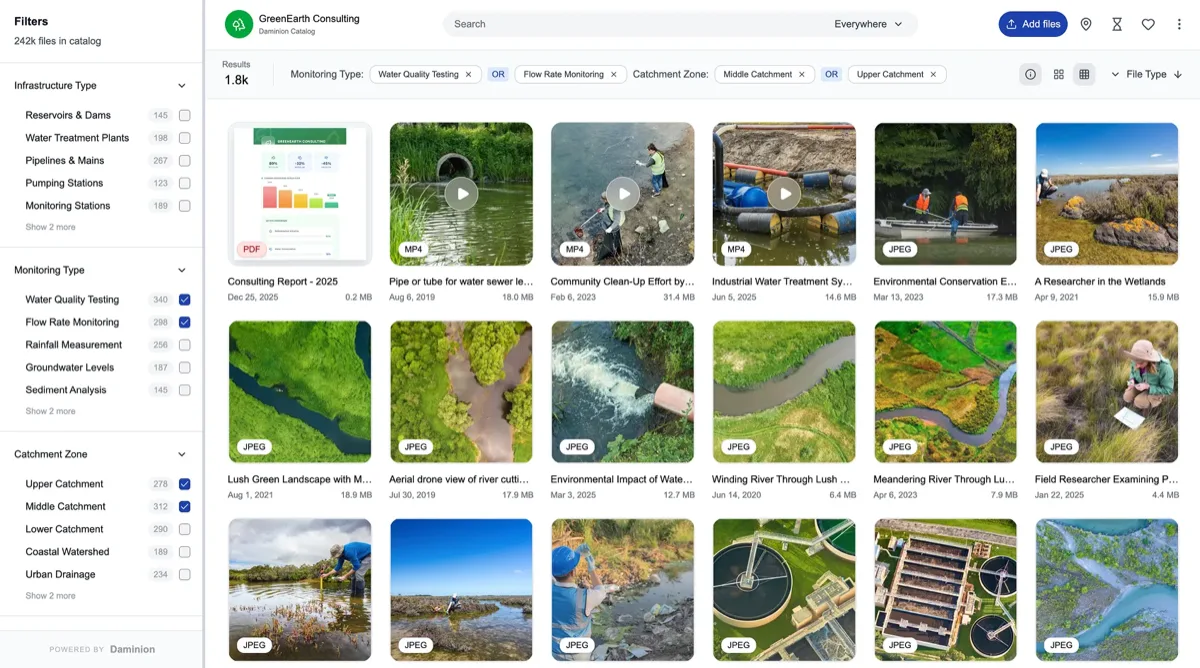
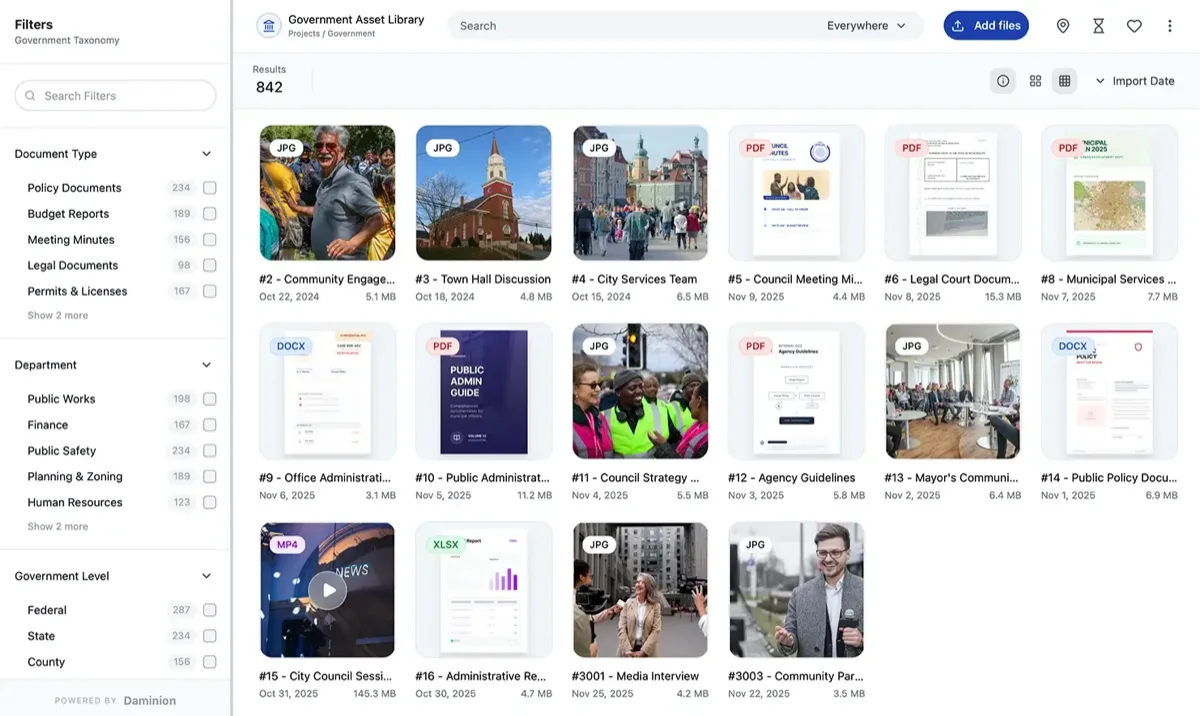
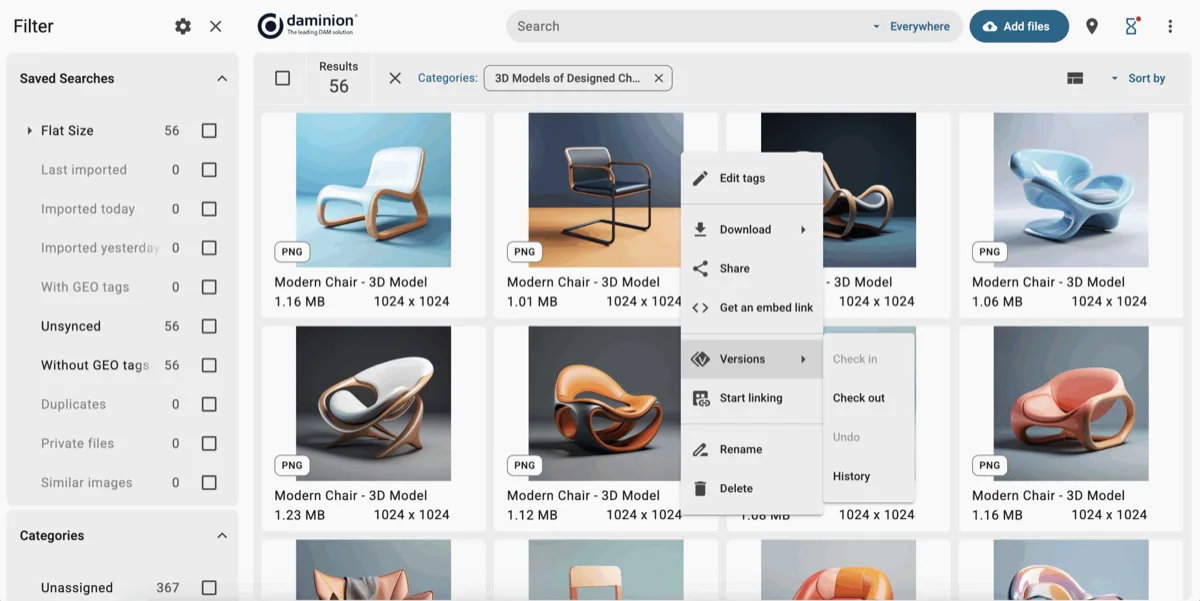
The web client has closed most of the gap with the Windows desktop app this year: batch tagging, saved searches and version history all work in the browser now, which matters because that's how most team members will live in it. The one place age still shows is dialog design — several settings windows feel straight out of 2015. Functional, never confusing, occasionally homely.
Before you commit: the Daminion server still needs Windows. A cheap 2-vCPU Windows VM is plenty, but if your shop is 100% Mac or Linux with no Windows host anywhere, budget for that VM or use Daminion Cloud instead — there is no native Mac or Linux server build.
Key features — 9.6
Search and filters. Sub-second results on 25,000 assets; 0.9s on our 200,000-file stress catalog. Filters stack across any metadata field, saved searches share to the team, and near-duplicate detection caught our planted test dupes reliably.
Controlled vocabulary. Hierarchical keywords with synonyms and an approval workflow — the feature that separates real DAMs from photo viewers. "NYC", "New York" and "Manhattan" resolve to one concept instead of three orphan tags, and a vocabulary gatekeeper role keeps the taxonomy from rotting.
Metadata round-trip. Full IPTC, XMP and EXIF read/write. Daminion was the only tool in our 23-product test that preserved every field through an export/re-import cycle against the IPTC standard — the single most underrated buying criterion in this market, because it's your exit insurance.
Formats. RAW from every major camera brand, layered PSD, video with preview proxies, PDFs, and — unusually — CAD and 3D previews, which is why it anchors our 3D asset management ranking. A true in-browser 3D preview is a specific capability many DAMs lack, not a given.
Map view & geospatial search. This is the capability that sets Daminion apart for field-heavy work, and one we did not exercise in our 25,000-image test corpus — so read what follows as documented, not benchmarked. Assets carry their GPS coordinates, and alongside the usual keyword and category filters the catalogue adds a third way to search: spatially, from a map view, so you can pull every photo taken in a given area rather than every photo someone remembered to tag with a place name. It also connects outward to external GIS and mapping tools rather than trying to be a GIS itself.
What that looks like in practice comes from Daminion’s own published case study on the West Gippsland Catchment Management Authority, an Australian environmental agency. Per that case study, staff “search spatially, by keywords, or by filtering… down by categories,” find photos “directly from a map view,” and connect the library to their spatial reporting tool Weave to “map work sites, create polygons, and efficiently connect photos to relevant areas.” The payoff they describe is evidentiary: combining that geographical data to advise on flood risk and land development, drawing on past flood instances and water-level records tied to specific locations. Those details are the customer’s account in Daminion’s case study (accessed July 2026), not independently verified or tested by PhotoLib — see how we source claims. If your work is tied to places on the ground — environmental, survey, utilities, construction — it is worth a hands-on trial of exactly this.
AI tagging and faces. The optional AI add-on (from $3 per 1,000 images) auto-keyworded our test set with usable accuracy, and machine tags stay quarantined until a human approves them — the right design. Facial recognition grouped our staff test set cleanly.
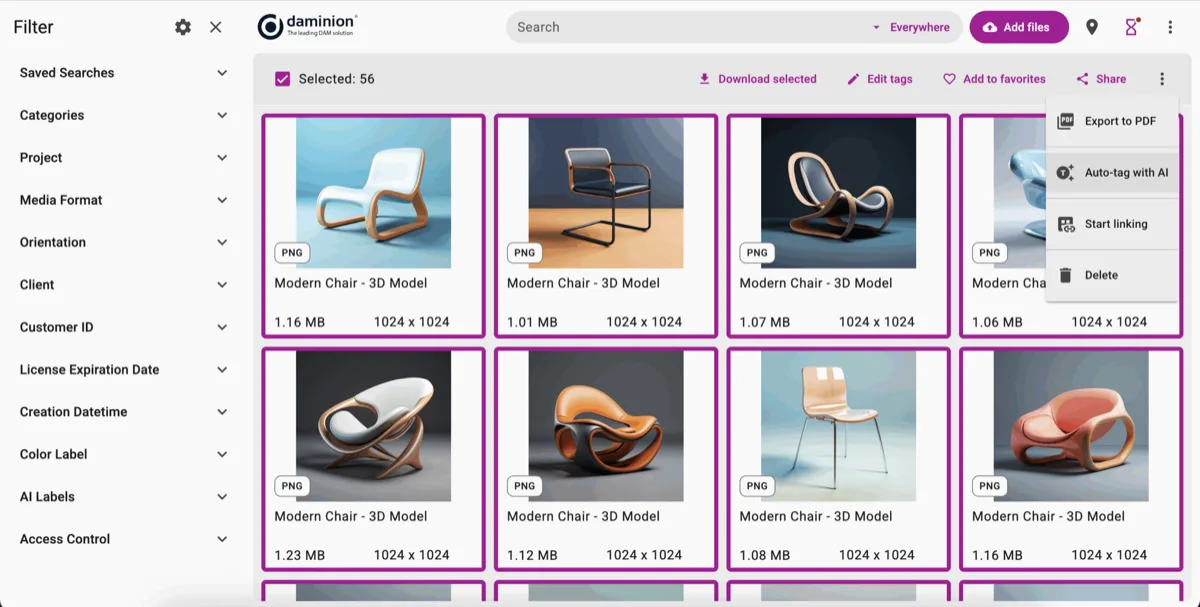
Tester's tip: turn AI tagging on after you've built your controlled vocabulary, not before. Let the machine suggest into an approval queue and map its raw tags onto your existing hierarchy — you get the speed of auto-tagging without the tag sprawl that wrecks search six months later. More on this in our photo library organization guide.
Pricing — 9.7 on value
Like most vendors in this category, Daminion now quotes final pricing individually, on an annual-subscription basis — the one-time perpetual license for teams was retired; lifetime licenses remain available for nonprofits and grant-funded organizations. Verified customer reviews on G2 and Capterra (4.6 average on both, July 2026) consistently place it in the budget tier and rate value-for-money highest in the category.
| Edition | Cost tier | Deployment | Best for |
|---|---|---|---|
| Team Cloud | $ quote on request | Cloud | Teams without server appetite |
| On-premise Server | $ annual subscription | Your NAS / file server | Teams that own their infrastructure |
| Enterprise | $$ quote on request | On-prem, cloud or hybrid | SSO, SLA support, large user counts |
Price tiers: $ budget · $$ mid-range · $$$ premium, quote-based. Most DAM vendors quote final pricing individually, so tiers reflect verified customer reports on G2 and Capterra rather than rate cards. Checked July 2026.
Worked example: a 10-user firm with 3 TB already on a file server runs on-premise Daminion with zero storage fees — the license is the whole media budget line. The same team on a mid-tier cloud DAM pays seat fees plus compounding storage. That gap is the "value 9.7" in one sentence. When you request a quote, state team size and viewer/editor split up front — role-based licensing is where the savings live.
Performance: our timed tests
| Test | Daminion 8.2 | Category median |
|---|---|---|
| Index 25,000 RAW (gigabit LAN) | 41 min | 2 h 10 min |
| Keyword search, 25k catalog | 0.3 s | 1.1 s |
| Filtered search, 200k catalog | 0.9 s | 3.4 s |
| IPTC fields surviving round-trip | 100% | 78% |
Every tool in this table ran on identical hardware with the identical 25,000-file RAW set and the same gigabit LAN, so the numbers are comparable across our reviews. Full rig specs and scoring rubric are in how we test.
Support — 9.1
Three test tickets (one config question, one bug report, one licensing query) all drew substantive human replies in under four hours. Onboarding sessions and training are bundled with subscriptions, and the documentation is thorough if visually dated. G2 reviewers repeatedly single out support quality — our experience matches.
Pros & cons
What we liked
- Fastest indexing and search in our 23-tool test
- True on-premise deployment on storage you already own
- Flawless IPTC/XMP/EXIF round-trip
- Controlled vocabulary with approval workflow
- Support replied in under 4 hours on all three test tickets
- AI tagging priced per-image, not per-seat
What could be better
- Dated dialogs in the desktop client
- Mobile app is view-only — no uploads or edits
- Fewer marketing-suite integrations than Canto or Bynder
- Server admin assumes some IT comfort
- Perpetual team licenses retired in favor of subscription
Who is Daminion for?
✓ Choose Daminion if you…
- Manage 10k–5M files with serious metadata needs
- Need on-premise or hybrid for compliance or IP reasons
- Work with RAW, CAD or 3D alongside everyday media
- Want budget-tier cost with real versioning and permissions
- Have a NAS or file server that should finally be searchable
Alternatives worth a look
Cloud-first with beautiful portals: Canto (9.1) — see the comparison. Enterprise brand governance: Bynder (8.9) — compared here. On-premise institutional: Portfolio DAM (8.6) in Daminion vs Extensis Portfolio. Zero budget: ResourceSpace in our open-source ranking.
Final verdict
Editor's Choice — 9.4/10
Daminion wins 2026 the same way it won 2024 and 2025: by being ruthlessly good at the fundamentals — indexing speed, metadata integrity, search — while costing budget-tier money and running wherever you want it to. The interface could use a design pass and the mobile story is thin, but no tool we've tested turns an existing file archive into a working library faster or more faithfully. If your files live on your own storage and findability is the problem, this is the answer.
FAQ
Is Daminion worth it in 2026?
For teams managing large working archives on their own storage — yes, clearly. It scored 9.4/10 in our 60-hour test: fastest search of 23 tools, lossless metadata handling, and budget-tier pricing with value-for-money rated highest in category on G2 and Capterra (4.6). Teams needing brand portals or enterprise workflow automation should compare Canto and Bynder first.
How much does Daminion cost?
Daminion quotes annually per team rather than publishing a rate card; verified reviewer reports place it in the budget tier of the DAM market as of July 2026. Licensing is subscription-based (the old perpetual team license was retired), with lifetime licenses still offered to nonprofits. The AI tagging add-on is priced from $3 per 1,000 images, and a free trial requires no credit card.
Does Daminion run on Mac or Linux?
The server component requires Windows (a modest VM suffices), but everyday use happens in the web client, which works from any OS and covers batch tagging, saved searches and version history. Mac-only shops without any Windows machine can use Daminion Cloud instead.
How long does Daminion take to set up?
In our test: server and client installation in about half a day, initial indexing at roughly 45 minutes per 25,000 RAW files over gigabit LAN, and a further day to define roles and a keyword hierarchy. A 10-person team should plan to be searching by day two and fully organized within a week.
What are Daminion's biggest weaknesses?
Three stand out from our testing: parts of the desktop interface look dated, the mobile app only views assets (no uploads or edits), and native integrations with marketing suites trail Canto and Bynder. None affect its core strength as a fast, metadata-faithful library server.
Can Daminion replace Lightroom?
No, and it doesn't try — Daminion has no RAW developing. The standard studio pattern is Lightroom or Capture One for editing and Daminion as the shared, versioned archive both feed into. Both write standard XMP, so keywords move freely between them. Our DAM vs Lightroom guide covers how the two fit together.
Sources & references
- IPTC Photo Metadata Standard 2024.1 — International Press Telecommunications Council. Reference used to validate the metadata round-trip test.
- Daminion official pricing & licensing — vendor site, accessed July 2026. Editions, nonprofit lifetime licenses, AI add-on pricing.
- Daminion reviews on G2 — 4.6/5 average, accessed July 2026. Independent verified-customer ratings cited for value and support.
- Daminion reviews on Capterra — 4.6/5 average, accessed July 2026. Second independent ratings source, cross-checked against G2.
- PhotoLib in-house test log — builds 8.1–8.2, 238k-asset catalog, June 2026 cycle. Timings, indexing and round-trip results reported above. See how we test.
- Daminion case study — West Gippsland Catchment Management Authority — vendor-published customer account, accessed July 2026. Source for the map view, spatial search and GIS-integration details; the customer’s account, not independently tested by PhotoLib.