Our verdict in 30 seconds: Daminion (9.4) is the best photo library manager for any archive that outgrew one person — shared catalog, lossless metadata, and it leaves your folders exactly where they are. Solo users on a budget should look at ACDSee (8.2, one-time purchase) or free digiKam (7.6); Lightroom Classic (8.6) still rules if editing and cataloging must live in one app.
Quick comparison
| Tool | Best for | Library limit (practical) | Tier | Score |
|---|---|---|---|---|
| 1. Daminion | Shared libraries, orgs | Millions of files | $ | 9.4 |
| 2. Lightroom Classic | Edit + manage, solo | ~150k comfortable | $ | 8.6 |
| 3. ACDSee Photo Studio | One-time purchase, Windows | ~500k | $ | 8.2 |
| 4. Eagle | Visual refs, designers | ~100k | $ | 8.1 |
| 5. Excire Foto | AI search, offline | ~500k | $ | 8.0 |
| 6. Adobe Bridge | Free with Creative Cloud | Folder-bound | Free | 7.9 |
| 7. Mylio Photos | Sync across devices | ~1M (vendor claim) | Free–$ | 7.8 |
| 8. digiKam | Free & open source | ~1M | Free | 7.6 |
| 9. Synology Photos | NAS owners, families | NAS-bound | Free w/ NAS | 7.7 |
| 10. Apple Photos | Mac/iPhone default | Device/iCloud-bound | Free | 7.4 |
Price tiers: $ budget · $$ mid-range · $$$ premium, quote-based. Most DAM vendors quote final pricing individually, so tiers reflect verified customer reports on G2 and Capterra rather than rate cards. Checked July 2026.
How we tested
Each tool ingested the same 25,000-image library (RAW + JPEG, 15 years of real shoots, deliberately messy metadata). We timed indexing, measured search latency on five standard queries, checked whether keywords survive a full export/re-import cycle against the IPTC Photo Metadata standard, and then re-ran the search suite on a 200,000-file stress catalog for the top scorers. Full protocol on our methodology page.
1. Daminion — best photo library management software overall
Daminion
★★★★★ 4.8Best for: libraries that belong to a team, a company, or a future you with 500,000 more photos.
Pros
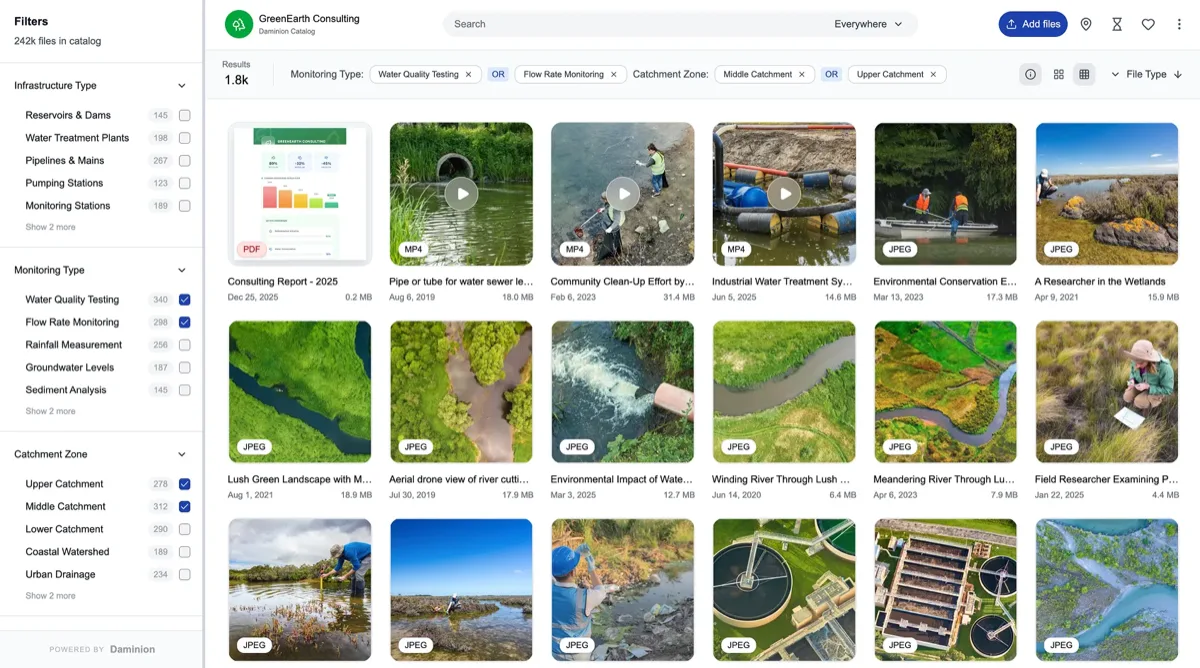
- Sub-second filtered search at 200k files in our stress test
- Only tool tested that round-tripped every IPTC field intact
- Multi-user with roles: photographer edits, clients view
- Indexes existing folders in place — zero migration risk
Cons
- No built-in RAW developing
- Windows server component; interface utilitarian in places
- Overkill for a phone-photos family library
Our verdict: Every other tool here manages your photo library. Daminion manages the photo library — the one your studio, marketing team, or municipality actually shares. Version-controlled edits, hierarchical keywords with synonyms, and the cleanest metadata engine we've measured make it the tool we'd trust with an archive we couldn't afford to lose. It's also our #1 on-premise DAM.
The rest of the field, in depth
Daminion wins for libraries that are shared or still growing, but most of the tools below are the right answer for a specific person. Here is what each of the other nine actually does well, how it behaved on the same 25,000-image test library, and where it breaks down — so you can match one to your situation rather than to a ranking number.
2. Adobe Lightroom Classic — 8.6
Best for: a solo photographer who wants catalog and RAW editing in one app · Practical ceiling: ~150k images · Tier: subscription ($)
Lightroom Classic is still the best single-user combination of catalog and darkroom, and nothing else here matches the way keywords, collections and develop history live in one place. On our test library it indexed and searched comfortably, and its hierarchical keywords are genuinely powerful. The catch that decides everything downstream: those keywords only leave the catalog as clean IPTC/XMP if you switch on automatic XMP writing (or save metadata to file by hand) from day one. Skip that and your tagging lives in a single catalog database that is yours alone.
Two things keep it out of the top spot. The catalog gets sluggish and, in our experience, fragile past roughly 150,000 images — and it is fundamentally single-user, with no shared catalog a team can open at once. For one working photographer it is close to ideal; for an archive that must be shared or that will keep growing, it is the wrong shape. Write XMP sidecars from the start so your metadata is portable if you ever move on.
3. ACDSee Photo Studio — 8.2
Best for: Windows users who want to own their software outright · Practical ceiling: ~500k images · Tier: one-time purchase ($)
ACDSee is the best library manager you can buy once and keep. Browsing is fast, cataloging is capable, it has face recognition and a real RAW editor built in, and — unlike Lightroom — its database stayed healthy for us well up toward half a million files. It reads and writes IPTC/XMP, so your keywords travel with the photos rather than being trapped in the app. Accuracy on that varies more than any other AI feature, which is why it gets its own face recognition ranking.
The honest caveats are platform and tagging model. The full Photo Studio line is Windows-first; the Mac product is a different, thinner application, so cross-platform teams can’t assume parity. And some of ACDSee’s organizational cleverness — categories, colour labels — is stored in its own database, so decide early which of your work you keep as portable embedded metadata. For a Windows photographer who resents subscriptions, it is the obvious starting point.
4. Eagle — 8.1
Best for: designers and visual reference libraries · Practical ceiling: ~100k items · Tier: one-time purchase ($)
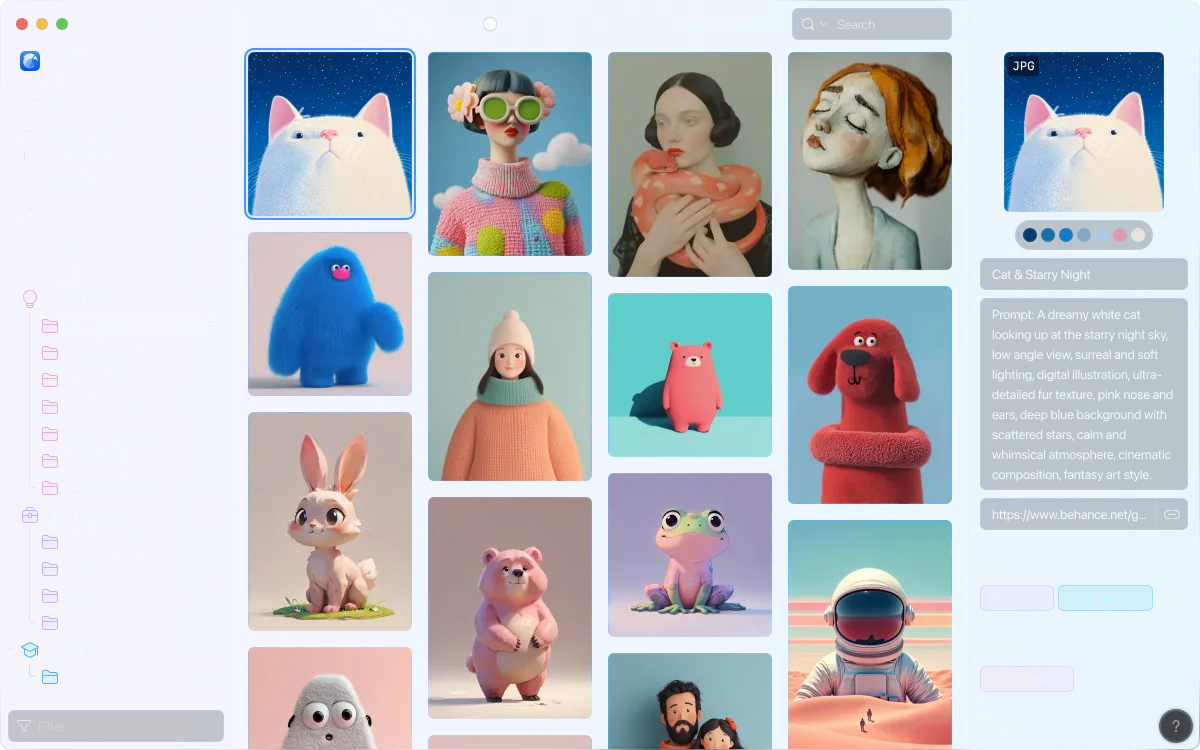
Eagle was built to organize design references — screenshots, UI, illustration, moodboards — and photographers adopted it because the browsing experience is genuinely lovely and fast, with colour search, auto-grouping and tagging that feel effortless. On a mixed visual library it is a joy to move around, which is exactly why it scores as well as it does.
But it does not write IPTC/XMP back into your files — tags and metadata live inside Eagle’s own library package. That single fact defines its role: Eagle is a wonderful visual index, not an archive of record. If Eagle ever goes away, so does the organizing work, unless you re-tag elsewhere. Use it as a fast front end for finding things, and keep your authoritative keywords in a tool that embeds them.
5. Excire Foto — 8.0
Best for: AI search over an existing local archive, fully offline · Practical ceiling: ~500k images · Tier: one-time purchase ($)
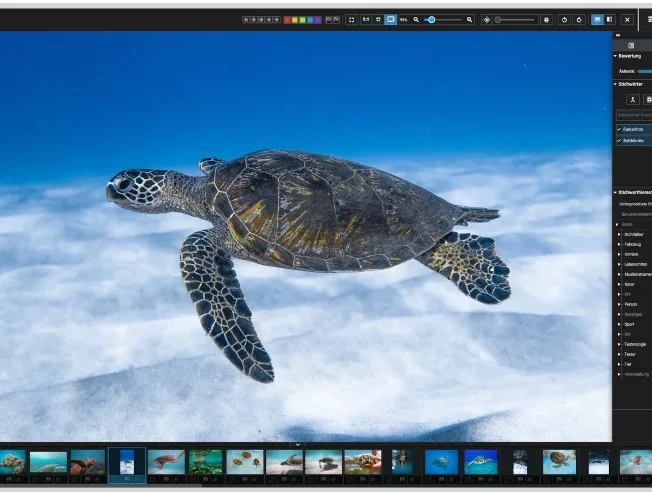
Excire’s trick is AI tagging and natural-language search that run entirely on your own machine — no cloud, no upload — over folders you already have. Point it at a messy archive and you can suddenly find “two people on a beach at sunset” without ever having typed a keyword. As a discovery layer over an existing library, and at its one-time price, nothing we tested matched it.
Where it thins out is everything around search. Excire will write its AI keywords into your photos, but it is light on the broader batch-metadata work — controlled vocabularies, bulk field editing, rename-and-restructure — that a full manager does. Treat it as the smartest search you can bolt onto an archive (it also runs as a Lightroom plug-in), not as the system of record itself.
6. Adobe Bridge — 7.9
Best for: anyone already paying for Creative Cloud · Practical ceiling: folder-bound · Tier: free with any CC app
Bridge is the quiet workhorse that ships free with any Creative Cloud subscription, and it does one thing very well: proper IPTC/XMP editing, including metadata templates you can stamp across a shoot, with no catalog to build or maintain. For applying copyright, credit and keywords to a batch of files before they go anywhere, it is faster to reach for than a full DAM.
The absence of a database is the point — and the ceiling. With no catalog, Bridge browses folders live, so there is nothing to corrupt but also nothing to accelerate search across a large, deep tree; it slows as folders grow, and it can only work with what is in front of it. It is an excellent starter and metadata editor; most people outgrow folder-bound browsing within a year and graduate to a cataloged tool.
7. Mylio Photos — 7.8
Best for: one personal library synced across every device, no cloud · Practical ceiling: ~1M (vendor claim) · Tier: free–$
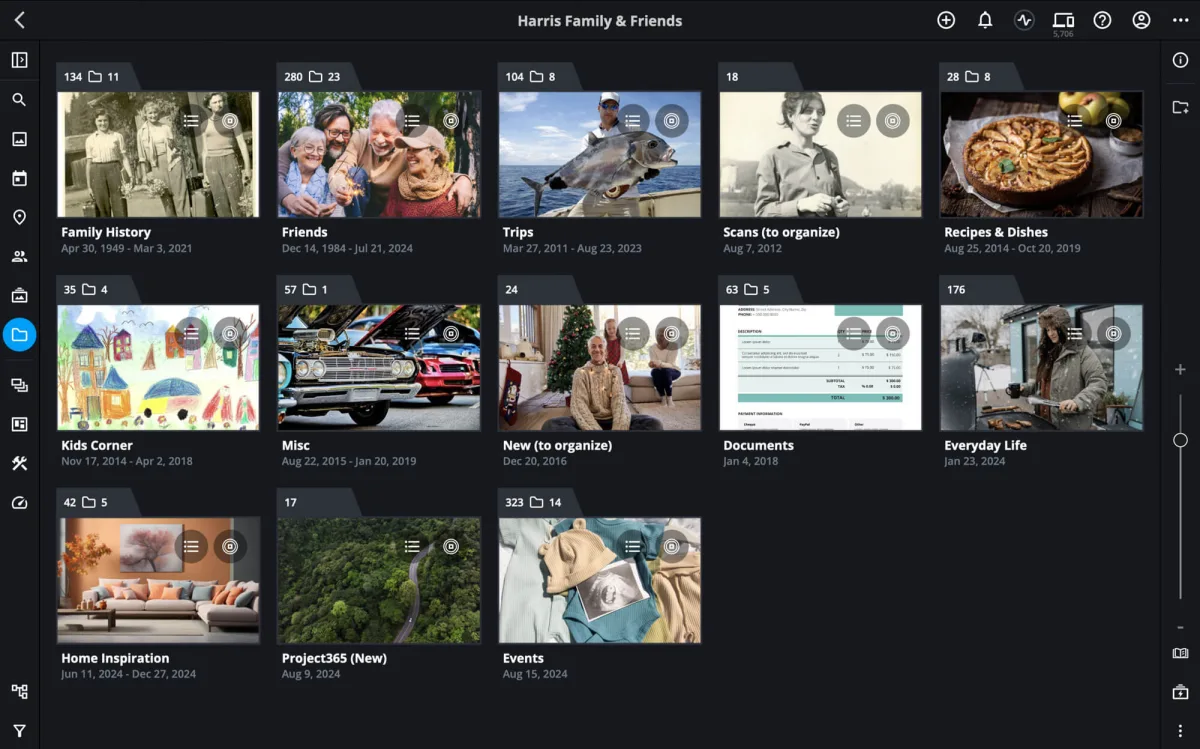
Mylio answers a question the others largely ignore: how do you keep one deduplicated library in sync across a laptop, a phone and a NAS without handing it to a cloud provider? It syncs peer-to-peer on your own devices, keeps originals where you choose, and adds the consumer niceties — face grouping, a calendar view, automatic phone import — that make a lifetime of family photos usable.
The trade-off is depth. Its metadata tooling is consumer-grade next to ACDSee or digiKam, and the million-image ceiling is the vendor’s claim rather than something we pushed to in testing, so treat it as a headline, not a guarantee. For a personal archive that has to live on several devices at once and never touch a cloud, though, it is the most compelling option here.
8. digiKam — 7.6
Best for: technical users who want power at zero cost · Practical ceiling: ~1M images · Tier: free & open source
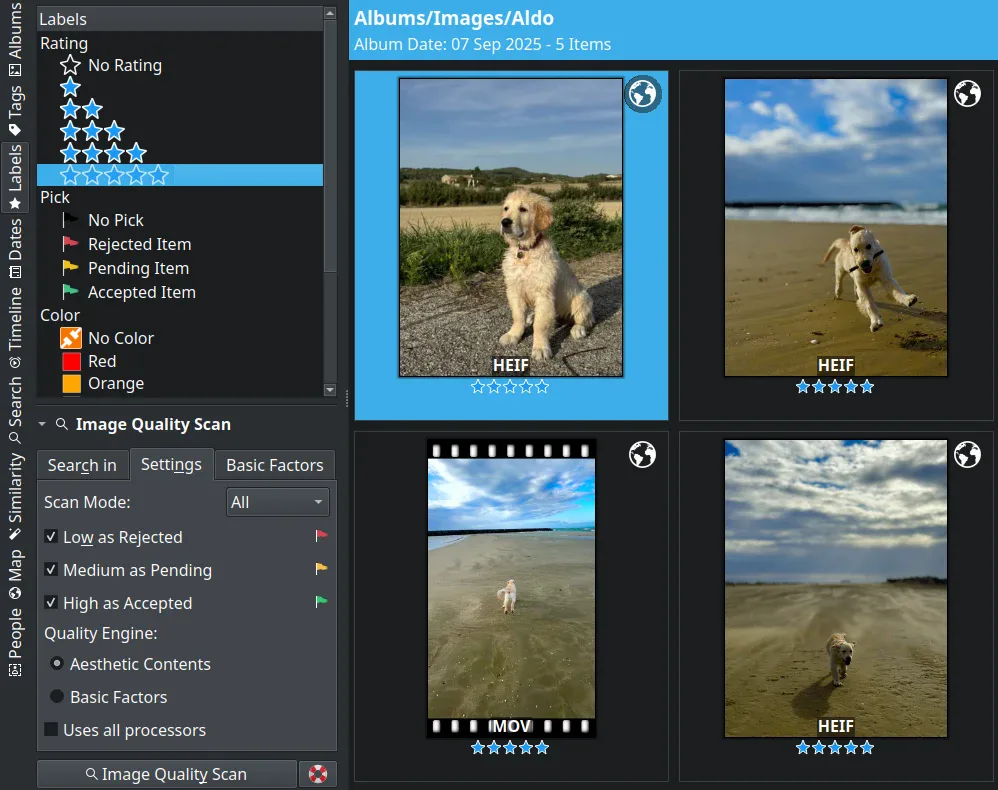
digiKam is the free tool that embarrasses several paid rivals. It runs on a real database (SQLite or MySQL), does hierarchical tags, face detection and proper XMP sidecar support, and it scaled to very large libraries in our testing without falling over. For a budget of exactly zero, nothing else here gives you this much genuine DAM capability.
What you pay instead is in polish and patience: the interface is dense, setup rewards someone comfortable with settings, and the learning curve is steeper than any commercial option on this list. If that describes you, it is an outstanding pick — and it tops our dedicated free and open-source DAM ranking, where its trade-offs are covered in full.
9. Synology Photos — 7.7
Best for: people who already own a Synology NAS · Practical ceiling: NAS-bound · Tier: free with the NAS
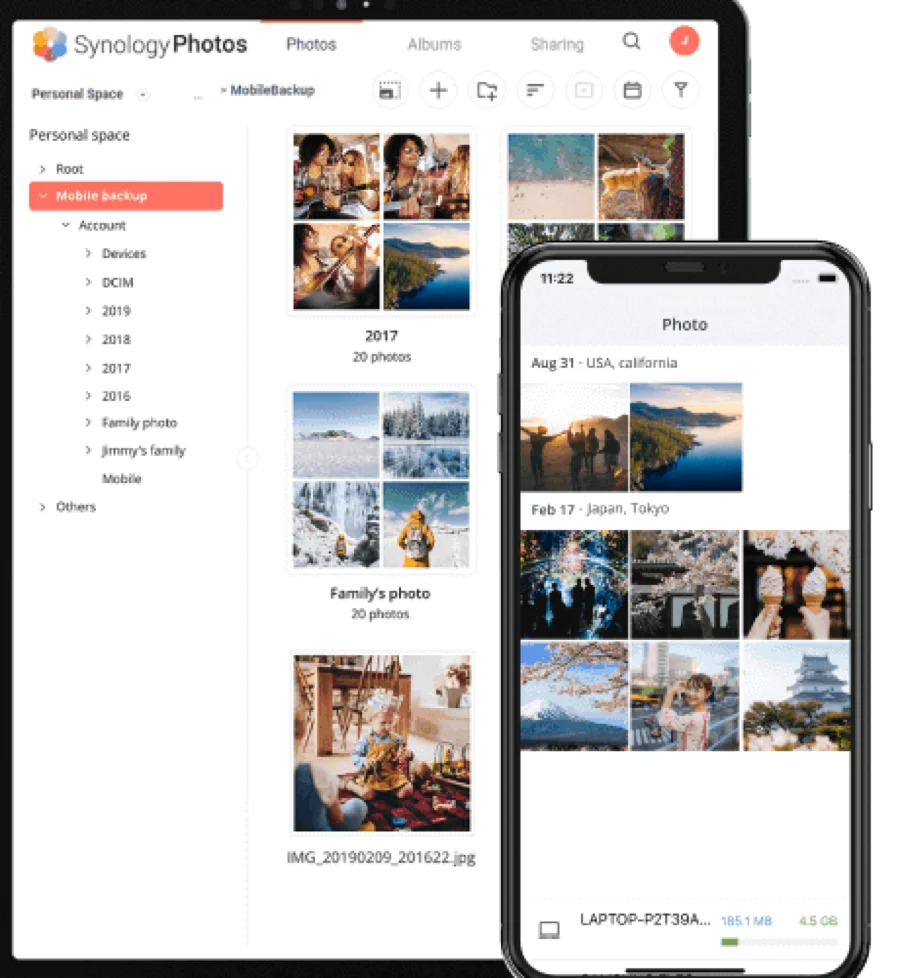
If you own a Synology NAS, Synology Photos is already installed and already storing your originals on hardware you control. It does automatic phone backup, face grouping and shared family albums well, and for a household that wants its photos off other people’s clouds without buying more software, that is a strong, self-hosted starting point.
As a professional library manager it is shallow: keyword and metadata handling and search are basic next to a real DAM, and everything is bound to the NAS it runs on. The right pattern for serious archives is usually to keep the files on the Synology but point a proper cataloging tool at them — exactly the layering our Synology photo management guide and DAM-for-NAS ranking walk through.
10. Apple Photos — 7.4
Best for: a Mac/iPhone household’s everyday photos · Practical ceiling: device/iCloud-bound · Tier: free
Apple Photos is excellent at exactly what it sets out to do — sync across your Apple devices, group faces, surface memories — and for most people’s phone photos it is a perfectly good default. Nothing here is easier to live in day to day.
It is opaque at everything archival, though, which is why it anchors the list. Your originals are hidden inside a package library rather than sitting in folders you can navigate, and exporting can quietly shed metadata unless you are deliberate about how you do it. It is a fine place for your photos to live and a poor foundation to build an archive on — the moment you need portable keywords, shared access or a folder structure you own, you have outgrown it. (No screenshot here: its library deliberately hides the file-level view the rest of this page is about.)
Photo library software, image database, or full DAM?
These labels blur together in search, and the difference is mostly scale and audience rather than technology. Photo library software — the tools on this page — catalogs, keywords and searches a photographer's or household's images. Image database software, image library software and image management software almost always mean the same job described for an organization: a shared, permissioned, searchable store of the same pictures. The moment you add non-photo formats — video, PDFs, 3D — and more than one team, you've crossed into digital asset management (DAM), and a tool like Daminion covers all three roles from one catalog. If you're unsure which term fits you, our what-is-DAM primer draws the practical line at roughly 50,000 files or the first library a team has to share.
What it costs and how long it takes
As of July 2026: digiKam, Bridge (with CC), Synology Photos and Apple Photos are free. One-time purchases — Eagle, Excire, ACDSee — run roughly $30–180 on public price lists. Lightroom comes with Adobe's ~$10–12/month Photography plan. Daminion is quoted per team (budget tier per verified G2 reports) with a free trial. Worked example: moving a 60,000-image family-plus-freelance archive from folders into ACDSee took us one evening of indexing plus two weekends of tagging; the same archive into Daminion with the AI-tagging add-on (from $3 per 1,000 images — about $180 for the lot) compressed tagging to roughly a day of review. What if your library lives on an external drive? Every desktop tool here handles that; just never let two machines write to one catalog file simultaneously — that's the classic corruption scenario, and the reason teams end up on server-based tools.
FAQ
What is the best photo library management software in 2026?
For shared or organizational libraries, Daminion is our 2026 pick — multi-user cataloging, lossless IPTC/XMP handling, and sub-second search at 200,000 files. For solo users, Lightroom Classic (subscription) and ACDSee Photo Studio (one-time purchase) lead; digiKam is the best free option.
How many photos can these programs actually handle?
In our testing: Lightroom Classic stays comfortable to roughly 150,000 images; ACDSee and Excire handled 500,000; digiKam and Mylio claim around a million; Daminion is designed for multi-million-file archives and stayed sub-second at our 200,000-file stress test. Past those points, the bottleneck is usually your storage speed, not the software.
How much does photo library software cost?
Free: digiKam, Adobe Bridge (with CC), Synology Photos, Apple Photos. One-time: about $30–180 for Eagle, Excire Foto or ACDSee as of July 2026. Subscription: Adobe Photography plan from roughly $10–12/month; Daminion quotes per team in the budget tier and offers a free trial.
Should I organize photos in folders or with keywords?
Both, with different jobs: a simple chronological folder structure (2026/2026-07-04-client-name) as the physical layer, and keywords/metadata as the search layer. Folders answer "where is it stored", keywords answer "what is it". Tools like Daminion and digiKam index your existing folders, so you never have to choose between the two. Our photo library organization guide walks through the full system.
What if I switch tools later — do I lose my organization?
Only if your tool kept metadata locked in its own database. Before committing, confirm the software writes keywords to IPTC/XMP (embedded or sidecar files). Daminion, Lightroom, ACDSee, Bridge and digiKam all do; Eagle and Apple Photos largely don't. Metadata that lives in the files travels with them to any future tool.
Is Google Photos or Apple Photos enough for photographers?
For finding casual pictures, yes — their AI search is genuinely good. For professional work they fail on control: compressed or hidden originals, shallow metadata editing, no RAW-plus-JPEG discipline, and exports that strip embedded data. Treat them as distribution and backup channels, not as the archive of record.
Is photo library software the same as an image database or image management software?
Largely yes — it's one job under different names. “Photo library software” is the photographer's term; “image database”, “image library software” and “image management software” are how businesses describe a shared, searchable, permissioned store of the same pictures. The tools overlap heavily — Daminion, ACDSee and digiKam each work as either — so the label matters less than whether the tool writes portable IPTC/XMP metadata and scales to your library size.
Sources & references
- Daminion — on-premise photo DAM, accessed July 2026.
- digiKam — open-source photo manager, accessed July 2026.
- Mylio Photos — multi-device photo library, accessed July 2026.
- IPTC Photo Metadata Standard — the metadata standard behind keyword and rights fields, accessed July 2026.
- PhotoLib test lab — James maintains a 410,000-image personal archive; we timed cataloging, de-duplication and search across these tools. See how we test.