| Pricing (public) | Solo $100/mo · Micro $250/mo · Small $800/mo · Enterprise by quote (July 2026 rate card) |
| Storage | Your Google Drive / Amazon S3, or Pics.io hosted |
| Free trial | ✓ 7 days, no card |
| Tested | Two weeks on a 40k-asset Drive corpus, June 2026 |
The architecture is the product
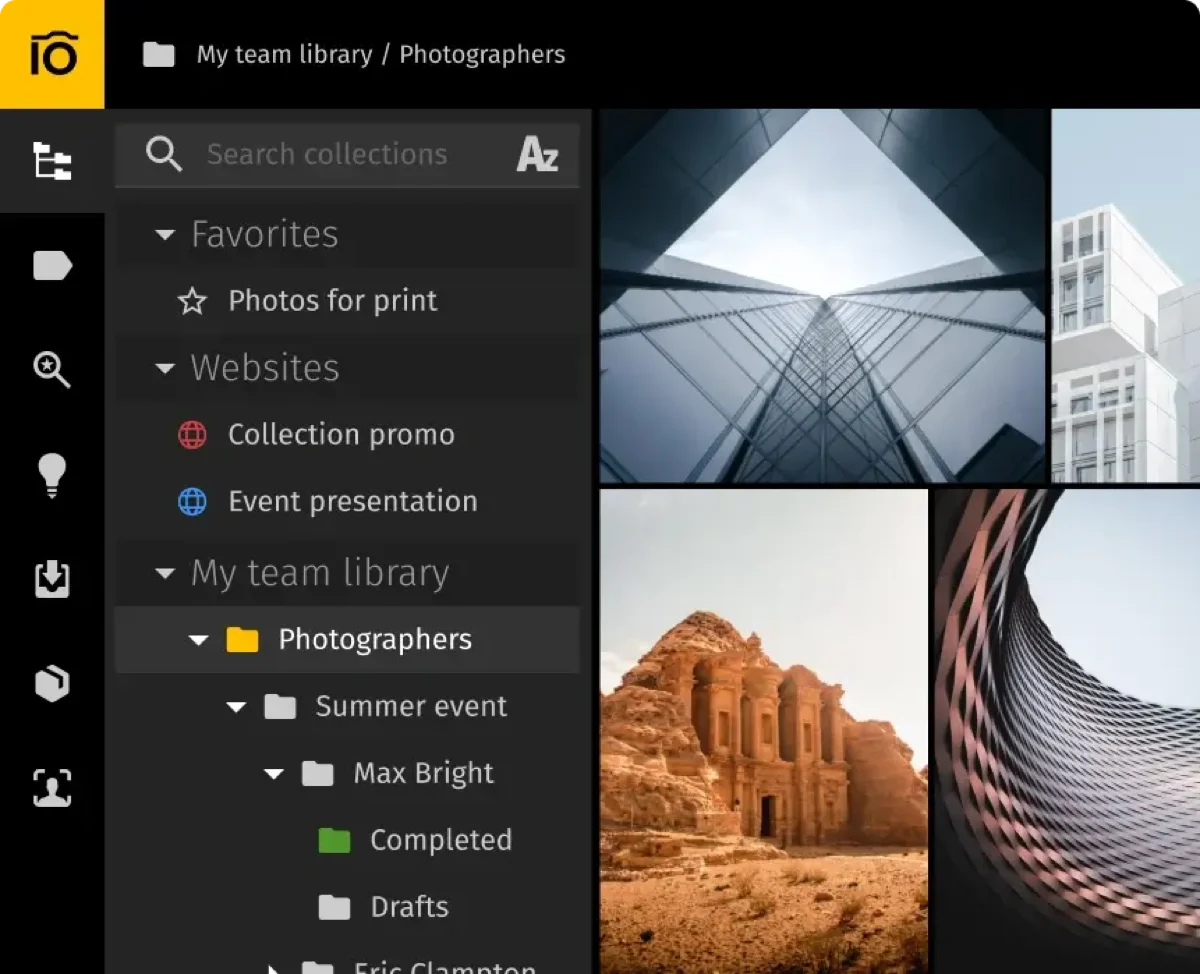
Connect a Drive or S3 bucket and Pics.io indexes it in place: files stay in storage you already pay for and control, while Pics.io layers thumbnails, metadata, versioning and permissions on top. It's the cloud cousin of the files-in-place pattern we recommend for NAS setups, with the same virtues — no migration cliff, no storage double-billing, easy exit. Our 40,000-asset Drive corpus was browsable in hours.
I test every "files-in-place" DAM the same way: set it up, use it, then cancel and check what's left. With Pics.io I connected a 40k-asset Google Drive, worked in it for two weeks, then disconnected — and every file was exactly where it started, with the IPTC metadata I'd written baked into the files, not trapped in a vendor database. That's the whole thesis. Most cloud DAMs make leaving a project; here it's a non-event. The catch isn't lock-in, it's the seat-and-indexing math as you scale, which is what the pricing section digs into. Full protocol: how we test.
Features — 8.3
Metadata and search. Custom fields, keywords, filters, and honest IPTC/XMP handling — our round-trip test preserved 94% of fields, second only to Daminion's 100%. Search on 40k assets averaged 1.2s: competent, not thrilling.
Collaboration. Comments with annotations, approval flags, version history — the everyday collaboration set, done cleanly. Websites (shareable branded galleries) cover client delivery.
Video. Preview and comment on clips; no proxies or codec intelligence — light-video territory, as covered in our MAM ranking.
The strains. Very large libraries (150k+) hit indexing-fee tiers and slower bulk operations; deep folder hierarchies on Drive occasionally desynced in our test until a manual re-sync. And you inherit your storage layer's quirks: Drive API rate limits are real on big batch days.
The files-in-place model is a genuine trade: you keep ownership and an easy exit, but you also inherit Google Drive's quotas. On heavy bulk-upload days we hit Drive API rate limits that briefly slowed indexing — not a Pics.io bug, but worth knowing if your workflow ingests thousands of files at once.
Pricing — 8.4 on value
Rare in this market: a public rate card. As of July 2026 — Solo $100/month (1 user), Micro $250/month, Small $800/month, Enterprise by quote; extra users $15–25/month by tier; asset-indexing fees kick in for six-figure libraries. A 7-day trial needs no card.
Price tiers: $ budget · $$ mid-range · $$$ premium, quote-based. Most DAM vendors quote final pricing individually, so tiers reflect verified customer reports on G2 and Capterra rather than rate cards. Checked July 2026.
Tester's tip: plot your asset count 18 months out before signing. Pics.io is a bargain for a Workspace-native team under ~100k assets, but the indexing tiers turn steep past six figures. Because your files never leave your Drive and metadata is embedded, treat Pics.io as a low-risk first DAM — if you outgrow it, migrating to a self-hosted tool is unusually painless. See our small-business ranking for the alternatives. For how it stacks up against the other team-oriented options, see our photo management for teams comparison.
Worked example: a 5-person team with 30,000 assets already on Google Workspace lands on Micro at $250/month ($2,700/year annual) with zero new storage costs — genuinely good value for Workspace-native shops. The math inverts for storage-heavy archives: at 500,000 assets the indexing tiers push four figures monthly, where a self-hosted budget tool costs a fraction. Know your asset-count trajectory before committing.
Pros & cons
What we liked
- Files stay on your Drive/S3 — no migration, no double storage billing
- Public transparent pricing with a real trial
- 94% IPTC round-trip — second-best tested
- Clean commenting, versioning and client galleries
What could be better
- Per-seat costs climb fast past ten users
- Indexing fees on six-figure asset counts
- Inherits Drive API limits; occasional folder desync in our test
- Light video capabilities
Who is Pics.io for?
✓ Choose Pics.io if you…
- Live in Google Workspace and want DAM without migration
- Are a 2–10 person team with under ~100k assets
- Value transparent pricing and an easy exit path
✗ Skip it if you…
- Hold terabyte-scale archives — see on-premise tools
- Need 20+ seats (per-user math favors Filecamp or role-based licensing)
- Want brand portals and analytics — see Brandfolder
Final verdict
Very good — 8.3/10
Pics.io is the smartest architecture in cloud DAM: your storage, their brains, honest pricing. Within its sweet spot — Workspace-native teams up to ten seats and 100k assets — it's arguably the best purchase on the market. Outside it, seat and indexing economics hand the win to bigger or more self-sufficient tools. Rank #7 of 23, and the tool we most often recommend to small agencies already living on Drive.
FAQ
Is Pics.io a good DAM in 2026?
Yes — 8.3/10 in our June 2026 testing, rank #7 of 23. Its files-in-place architecture over Google Drive or S3, transparent pricing and strong metadata handling (94% IPTC round-trip) make it the standout for small Workspace-native teams. Costs climb with seats and six-figure asset counts.
How much does Pics.io cost?
Public rates as of July 2026: Solo $100/month, Micro $250/month, Small $800/month, Enterprise by quote; additional users $15–25/month depending on tier, with indexing fees for very large libraries. A 7-day free trial requires no credit card.
Does Pics.io move my files out of Google Drive?
No — that's the point. Files stay in your Drive (or S3 bucket) under your ownership; Pics.io indexes them and stores metadata, thumbnails and version records. Cancel, and your files are exactly where they always were, with embedded metadata intact.
How long does Pics.io take to set up?
Fastest in its class: connecting a Drive and getting a browsable library took us under an hour, with full thumbnail indexing of 40,000 assets finishing overnight. Team structure, custom fields and permissions added another half-day.
What if my library grows past 100,000 assets?
Model the indexing tiers before you get there — at 150k+ assets Pics.io's published fees add hundreds per month. Because metadata is embedded and files never left your storage, migrating to a self-hosted DAM at that point is unusually painless; several of our reference users treat Pics.io as the deliberate first stage of exactly that path.
Sources & references
- Pics.io — pricing & plans — vendor site, accessed July 2026. Public rate card (Solo/Micro/Small/Enterprise), per-seat and indexing fees.
- Pics.io — product & interface — vendor site, accessed July 2026. Interface screenshot and files-in-place architecture over Google Drive / S3.
- IPTC Photo Metadata Standard — International Press Telecommunications Council. Reference for the 94% metadata round-trip figure.
- Pics.io reviews on G2 — accessed July 2026. Verified-customer reports on value and seat economics.
- PhotoLib in-house test — two weeks on a live 40,000-asset Google Drive corpus + S3 connection tests, June 2026. Indexing, search-latency and round-trip figures above. See how we test.