Our verdict in 30 seconds: Daminion (9.4) is the best team photo manager of 2026 — server-based shared catalog, granular roles, budget tier. Canto (9.1) wins for marketing teams that want zero-IT cloud onboarding; Filecamp (8.1) is the cheapest way to give unlimited users access to a shared library.
Quick comparison
| Tool | Best for | Users | Tier | Score |
|---|---|---|---|---|
| 1. Daminion | Working libraries, control | Per-role licensing | $ | 9.4 |
| 2. Canto | Marketing teams, cloud | Per user | $$ | 9.1 |
| 3. Pics.io | Google Workspace shops | Per user | $$ | 8.3 |
| 4. PhotoShelter | Photo-heavy orgs, athletics | Per plan | $$ | 8.3 |
| 5. Filecamp | Budget, client sharing | Unlimited | $ | 8.1 |
| 6. Mylio Photos | Small family-style teams | Household | Free–$ | 7.8 |
| 7. Lightroom + CC libraries | Adobe-only workflows | Per seat | $$ | 7.5 |
Price tiers: $ budget · $$ mid-range · $$$ premium, quote-based. Most DAM vendors quote final pricing individually, so tiers reflect verified customer reports on G2 and Capterra rather than rate cards. Checked July 2026.
1. Daminion — best photo management for teams overall
Daminion
★★★★★ 4.8Best for: teams of 5–500 where photos are working assets: marketing, engineering, architecture, museums.
Pros
- Real roles: viewers, editors, admins — down to collection level
- Version control with visible history — who changed what, when
- Deploy on your server or in Daminion's cloud
- Consistently the best value-for-money ratings in category (G2/Capterra 4.6)
Cons
- UI is functional, not fashionable
- Branded client portals are basic compared to Canto
- Mobile app is view-only
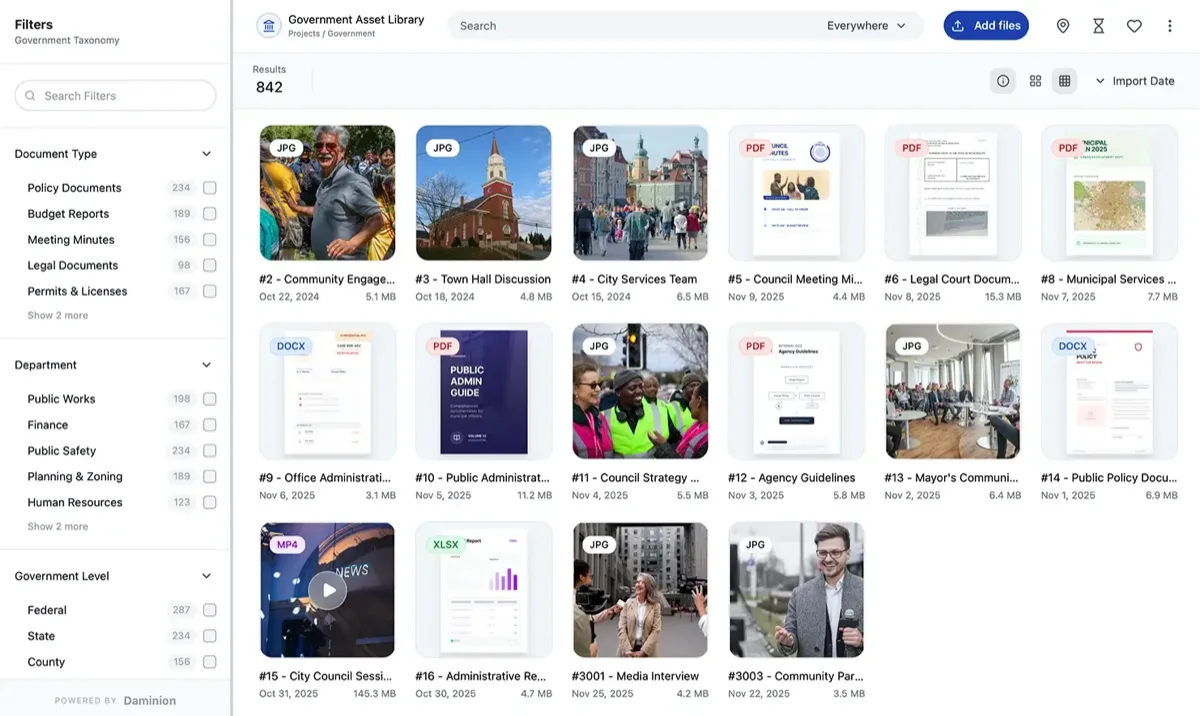
Our verdict: Daminion treats a team photo library as infrastructure, not a gallery. Permissions are granular enough for a municipality (public affairs edits, departments view), versioning means nobody overwrites the retouched master, and because it indexes your existing file server, adoption doesn't require moving a single folder. That combination at a budget tier is why it wins this category. Marketing-led teams that prioritize portals over control should read our Daminion vs Canto comparison before deciding.
2. Canto — the frictionless cloud option
Canto
★★★★★ 4.6Best for: marketing teams that want the library live this week with zero IT involvement.
Canto's onboarding is the smoothest we've tested — our pilot team was self-sufficient on day two. Branded portals and share links delight clients, and the AI tagging queue keeps machine keywords from polluting the taxonomy. The trade-offs: mid-tier subscription costs that scale with users, cloud-only storage, and search that noticeably slows past 100k assets. Full analysis in our Canto review.
The rest of the field, tool by tool
Five more options, and the useful way to read them is by what they assume about your team: that it lives in Google Workspace, that it is a photo department, that it is large but casual, or that it barely exists yet.
3. Pics.io — 8.3: DAM on top of storage you already rent
It runs over Google Drive or S3, so the files stay in storage you are already paying for — a genuinely clever architecture for a Workspace-centric team, and the lowest-friction way to add search without a migration. Versioning and commenting are solid.
Public pricing starts around $100/month and is per-seat above that, so model it at your real headcount. See our Pics.io review. Best for: teams already standardised on Google Workspace.
4. PhotoShelter — 8.3: built for photo departments
The photo-industry veteran, and it shows in the workflows: real-time galleries (FileFlow) and delivery paths designed around photographers rather than marketers. University athletics and comms departments lean on it heavily — our DAM for education and universities overview covers that structure.
It is less convincing as a general-purpose brand asset manager: if your library is as much logos and layouts as it is photography, the fit weakens. Best for: teams whose output is photography itself.
5. Filecamp — 8.1: unlimited users changes the arithmetic
Every plan carries unlimited users, which inverts the usual maths: a 40-person organisation pays what a 4-person one pays. For distributing approved photos to a large, casual audience — franchisees, volunteers, regional offices — nothing on this page matches the price per head.
Metadata depth is basic, so it suits distribution better than cataloguing a deep archive. Details in our Filecamp review. Best for: many light users, one shared set of approved assets.
6. Mylio Photos — 7.8: a shared library with no server
Household-oriented on paper, but a three-person studio can genuinely run a shared, synced library across every device without standing up any server at all.
The ceiling is permissions: there are none worth the name — everyone is effectively an admin — which caps it well before a real organisation. Best for: two or three trusted people and no IT.
7. Lightroom + Creative Cloud — 7.5: collaboration bolted onto a single-user tool
CC Libraries and shared albums add limited collaboration to what remains a single-user catalog. If the whole team lives inside Adobe apps all day, it is workable and nobody has to learn anything new.
As a system of record it is fragile, and per-seat Creative Cloud costs add up faster than most teams expect. Our DAM vs Lightroom guide covers why studios usually end up running both. Best for: Adobe-native teams who accept the limits.
Budgeting a team photo library
Worked example, July 2026: a 12-person marketing team, 80,000 images, 1.5 TB. Filecamp Professional: about $90/month on the public rate card, unlimited users, but you'll fight its shallow metadata at this volume. Pics.io: roughly $250–400/month at this seat count per its published tiers. Canto: mid-tier quote, typically low-five-figures annually per verified G2 reports. Daminion: budget-tier team quote — and if you deploy on an existing server, the 1.5 TB rides free on storage you own. Rollout time: 1–3 days for any of these; the real schedule item is metadata cleanup, roughly a week per 50,000 untagged files. What if adoption fails? The classic failure is uploading everything and organizing nothing — teams search once, find garbage, and go back to Slack-asking. Budget a curation sprint before launch: our organization guide has the checklist we use.
FAQ
What is the best photo management software for teams in 2026?
Daminion is our top pick for 2026: a server-based shared catalog with granular permissions, version control, and budget-tier pricing, deployable on-premise or in the cloud. Canto is the best pure-cloud alternative for marketing teams, and Filecamp is the value pick with unlimited users on every plan.
Can a team share one Lightroom catalog?
No — Lightroom Classic catalogs are single-user, and simultaneous access corrupts them. Adobe's cloud libraries allow limited sharing but lack roles and versioning. Teams that need true concurrent access use a server-based tool like Daminion or a cloud DAM like Canto, keeping Lightroom for individual editing.
How much does team photo management software cost?
Public rate cards as of July 2026: Filecamp from $29/month with unlimited users; Pics.io from $100/month. Canto and Daminion quote per team — verified G2 and Capterra reports place Daminion in the budget tier and Canto mid-range, with enterprise DAMs like Bynder far above both. Most vendors offer free trials; Bynder offers only demos.
How long does rollout take for a team photo library?
Software setup is fast: 1–3 days for Daminion, Canto, Pics.io or Filecamp in our deployments. The long pole is content: plan about a week of cleanup per 50,000 untagged images, or use AI tagging (Daminion's add-on starts at $3 per 1,000 images) to compress that to days of review work.
What if some team members just need to view photos?
Look hard at licensing models. Per-seat tools charge the same for a viewer as an editor; Daminion's role-based licensing and Filecamp's unlimited-user plans are dramatically cheaper when most of your team only searches and downloads. That difference alone often decides the category.
What's the best team photo management software for a company with no dedicated IT?
Pick a hosted cloud tool with nothing to run and maintain: Canto and Filecamp set up in a day or two and suit teams under 50 people without IT support. Daminion still fits if someone can own a Windows host or you take its cloud-hosted plan; skip heavier enterprise DAMs, which assume a dedicated admin during rollout.
Which team photo tools avoid hidden costs and long implementation?
Favour published, flat pricing and self-serve setup. Filecamp's plans with unlimited users have the fewest surprises, and Daminion, Canto, Pics.io and Filecamp all stood up in 1–3 days in our deployments. The hidden costs to watch — per-seat pricing that charges the same for viewers, storage overages, and enterprise onboarding fees — hit mid-market teams hardest, so get them in writing before you sign.
Sources & references
- Daminion — team/multi-user photo management, vendor site, accessed July 2026.
- Canto — cloud DAM, vendor site, accessed July 2026.
- Pics.io — DAM layered on Google Drive / S3, vendor site, accessed July 2026.
- PhotoShelter — photo-team galleries and workflows, vendor site, accessed July 2026.
- Filecamp — unlimited-user DAM pricing, vendor site, accessed July 2026.
- PhotoLib test lab — shared-library rollouts across teams from 4 to 400 seats. See how we test.