Our verdict in 30 seconds: Daminion (9.4) pairs reliable AI auto-tagging with an on-premise option, priced per image rather than per seat. Canto (9.1) has the best natural-language search we tested. Excire Foto is the strongest pure-AI tool for a solo photographer's local archive; Cloudinary is the pick if your developers will build the pipeline themselves.
Want the whole tagging workflow — hierarchical keywords, a controlled vocabulary and bulk apply, not just AI? See our best image tagging software ranking. This page focuses on AI auto-tagging and search.
Two different things called "AI" in DAM
Vendors use "AI-powered" to describe two distinct capabilities, and conflating them leads to buying the wrong tool. Auto-tagging analyzes assets on ingest and suggests keywords, objects and faces — it saves the manual keywording work. AI search (often "natural-language" or "semantic" search) lets you type a plain description and get matching results, whether or not those exact keywords were ever applied. A tool can do one, both, or neither well; the four below split roughly two-and-two.
My test for AI search is simple and a little unfair: type a description that was never manually tagged, and see what comes back. "Woman in red at trade show," typed into Canto with zero prior keywording, surfaced our planted shots immediately. Excire Foto did the same offline, against a 60,000-image local archive, in seconds. That's the bar — if an "AI-powered" tool can't do this, it's really just fast filename search with a marketing label.
The AI features that actually matter
Vendor pages list a dozen "AI-powered" bullets. In practice, AI DAM solutions do five things that matter:
- Auto-tagging (auto-keywording). The model reads an asset on ingest and proposes keywords for objects, scenes and concepts. It's what most people mean by "AI DAM", and what clears a keywording backlog. Our auto-tagging entry defines the term.
- Face recognition. Groups the same person across a library so a name becomes a searchable filter. Covered in depth in our DAM face recognition ranking.
- Text-in-image search (OCR). Reads the words inside screenshots, packaging, signage and scans, so they're findable without transcription.
- Natural-language (semantic) search. Matches a plain description against what an image shows, not against keywords someone remembered to apply.
- Duplicate and near-duplicate detection. Surfaces the same shot at four resolutions and three crops, where most of an old archive's dead weight sits.
Everything else — auto-cropping, background removal, generative fill — is production convenience, not library capability. And one caveat outranks the list: machine tags belong in a review queue, never straight into your controlled vocabulary. A model that is confident and wrong writes "sunset" onto a sunrise, and nobody catches it for two years. Approve in bulk if you like, but approve. The mechanics at backlog scale are in our AI tagging workflow guide.
Quick comparison
| Tool | AI strength | Runs where | Tier | Score |
|---|---|---|---|---|
| 1. Daminion | Auto-tagging + faces, human-approval queue | Cloud + on-premise | $ | 9.4 |
| 2. Canto | Best natural-language search we tested | Cloud | $$ | 9.1 |
| 3. Excire Foto | Offline prompt-based search, face/aesthetic ranking | Desktop, local files | $ | 8.0 |
| 4. Cloudinary | AI tagging + background removal via API | Cloud (API) | $–$$ | 8.5 |
Price tiers: $ budget · $$ mid-range, quote-based. Scores are each tool's overall PhotoLib score (see full reviews); this ranking orders them by AI capability specifically. Checked July 2026.
1. Daminion — best AI tagging with an on-premise option
Daminion
★★★★★ 4.8Best for: teams that want AI tagging without sending every image to a subscription-priced cloud API.
Pros
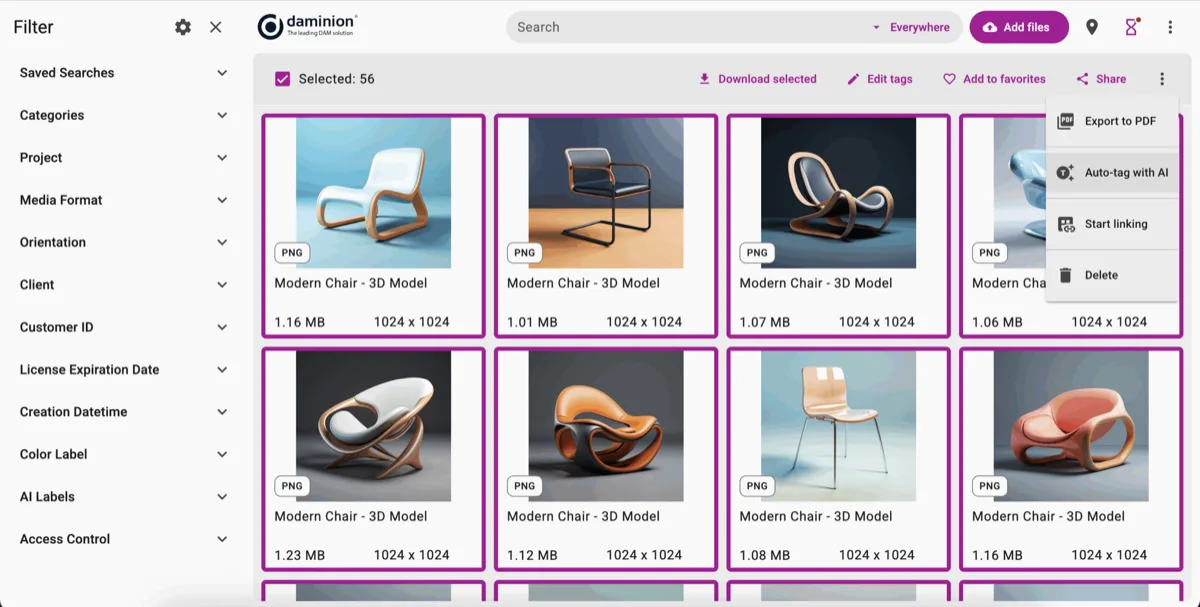
- AI add-on auto-keyworded our test set with usable accuracy
- Machine tags stay quarantined until a human approves them
- Priced per image ($3/1,000), not per seat — scales cheaply with volume, not headcount
- Facial recognition grouped our staff test set cleanly
Cons
- AI tagging is an optional add-on, not bundled in the base price
- No natural-language search — search is metadata/keyword-driven
Our verdict: Daminion's AI story is disciplined rather than flashy: it auto-tags reliably, never auto-publishes a machine guess as fact, and charges per image so a 200,000-asset archive doesn't cost more to tag than a 20,000-asset one just because more people use it. Full test in our Daminion review.
2. Canto — best natural-language search
Canto
★★★★★ 4.6Best for: marketing teams who want to find assets by describing them, not by remembering tags.
Pros
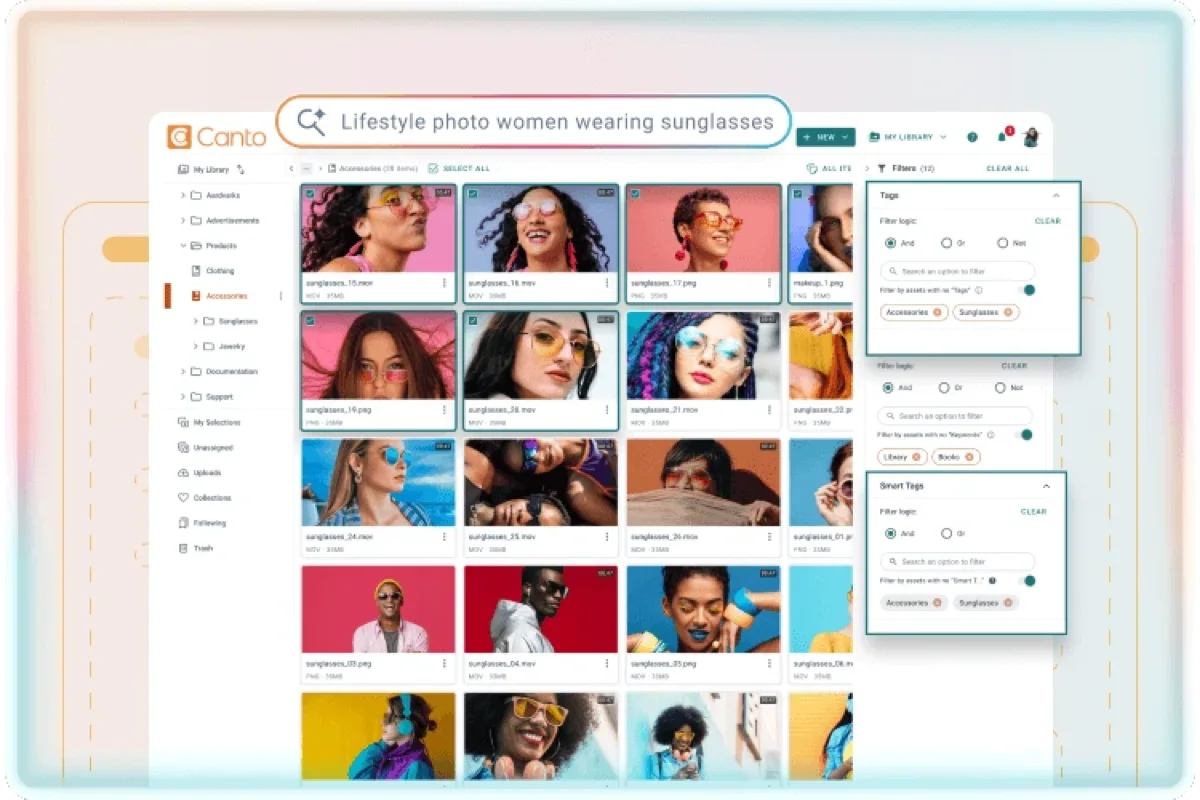
- Natural-language search found untagged test shots on the first try
- AI tagging with the same human-approval queue pattern
- Face recognition and text-in-image search both worked as advertised
Cons
- Cloud-only; AI processing happens on Canto's servers
- Mid-range pricing that climbs with seats
Our verdict: If the AI feature you actually want is "type what you're picturing and get the photo," Canto is the tool that delivers it most reliably today. Full test in our Canto review.
3–4: local-first and developer-first AI
3. Excire Foto — 8.0. The best pure AI search over local archives we've tested: prompt-based search, face and aesthetic ranking, entirely offline. We found "kids jumping into water, backlit" in a 60,000-image archive in seconds, with zero manual keywording. It's an analyzer more than a manager — no team features, no metadata governance — so pair it with a folder structure you already trust. The natural fit for a solo photographer who wants AI search without a subscription or a cloud upload. See it in our photographer DAM ranking.
4. Cloudinary — 8.5. AI tagging and background removal delivered through a developer-facing API and transformation pipeline, not a browsable library UI. The right choice when "AI" means automating a media pipeline behind a website or app, not helping a human browse a catalog. Credit-based pricing scales with usage rather than seats, which rewards high-volume automated workflows and can surprise teams that expected flat per-seat billing. See it in our main DAM ranking.
Auto-tagging vs. AI search: which do you actually need?
If your problem is "we have 200,000 untagged photos and no time to keyword them," you need auto-tagging — Daminion or Canto, both with a human-approval queue so machine guesses never silently become facts. If your problem is "people can't find things even with tags," you need AI search — Canto's natural-language search or Excire Foto's offline prompt search solve that directly. Most teams eventually want both; few tools today do both equally well, which is why this ranking splits the field rather than naming one universal winner.
Don't let AI tags skip review. Every tool worth using here queues AI suggestions for a human to confirm before they're written as searchable metadata. If a tool auto-publishes machine tags with no approval step, expect your controlled vocabulary to fill with near-duplicate, occasionally wrong terms within months.
FAQ
What is an AI DAM?
An AI DAM is digital asset management software that uses machine learning to do work a person would otherwise do by hand — mainly tagging assets on ingest, and matching a plain-language search to what an image actually shows. The label covers those two quite different capabilities, and few tools today do both equally well: of the tools we tested, Daminion and Canto lead on AI tagging, while Canto and Excire Foto lead on AI search.
What is AI tagging in a DAM?
AI tagging (also called auto-tagging or auto-keywording) is the DAM analyzing an asset and proposing keywords for what it contains — objects, scenes, and often faces — instead of waiting for someone to type them. In every implementation worth using, those suggestions land in a review queue rather than writing straight into your controlled vocabulary. Our auto-tagging glossary entry defines the term; the AI tagging workflow guide covers running it across a large backlog.
What AI features should an AI DAM have?
Five carry the weight: auto-tagging, face recognition, text-in-image (OCR) search, natural-language search, and duplicate detection. Auto-cropping, background removal and generative fill are production conveniences rather than library capabilities. Whichever you buy for, check that machine tags pass through a human-approval queue before they become searchable metadata — that single design decision separates the tools that stay useful from the ones that quietly fill a vocabulary with near-duplicate guesses.
Which DAM software has the best AI tagging?
For team catalogs, Daminion's AI add-on and Canto's built-in AI tagging both auto-keyword reliably and hold suggestions in a human-approval queue before writing them as metadata. For a solo photographer's local archive, Excire Foto's offline prompt-based search — finding a scene description across tens of thousands of images without any manual keywording — is the strongest pure-AI tool we tested.
Does AI auto-tagging replace manual keywording?
Not entirely. Every reliable implementation we tested queues AI-suggested tags for human confirmation rather than publishing them automatically, because auto-tags are good at generic content (objects, scenes, people) but miss business-specific context (campaign names, usage rights, client names) that only a human knows. For running that split across a large backlog, see our AI tagging workflow.
What is natural-language search in a DAM?
It lets you type a plain description — like "woman in red at trade show" — instead of exact keywords, and the AI matches assets by visual content. Canto's natural-language search found planted test photos in our library without any manual tagging at all.
Sources & references
- Daminion — AI tagging — vendor site, accessed July 2026.
- Canto — product & AI features — vendor site, accessed July 2026.
- Excire Foto — vendor site, accessed July 2026.
- Cloudinary — vendor site, accessed July 2026.
- PhotoLib test lab — June/July 2026, planted-query AI search test and bulk auto-tagging runs across four tools. See how we test.