Our verdict in 30 seconds: Daminion is the clearest hybrid architecture we tested — a server you install and control, paired with a web client for remote access with no VPN. Pics.io takes the opposite hybrid path: your files stay in storage you already own (Google Drive), while the interface itself is vendor-hosted. Portfolio DAM (formerly Extensis Portfolio) is a legacy on-prem tool now adding cloud access — see our Daminion vs. Portfolio DAM comparison for the detail on that transition.
What is a hybrid DAM?
A hybrid DAM — also called a hybrid cloud DAM — splits the job in two. Your master files stay on storage you already own: a server in the office, a NAS, the volume your originals sit on today. The catalog, the proxies and previews generated from those masters, and the links you send to people outside the building run through a cloud or web layer on top. Nobody has to be on the office network to find an asset, and nobody has to push an entire shoot into a vendor’s bucket to share one frame from it.
The point of the split is that each half is good at what the other isn’t. Local storage is cheap per terabyte and fast over a LAN, which is why big archives stay put. Browser access and external sharing are what a cloud DAM does well. Hybrid digital asset management buys both at once — the control of an on-premise DAM with the reach of a cloud one.
What "hybrid" actually buys you over pure cloud or pure on-prem
Pure cloud means you never touch a server, but your assets live on someone else's infrastructure under their terms. Pure on-premise means you control everything, but remote access usually means a VPN or nothing. A genuine hybrid setup tries to keep the control of on-prem — your storage, your backup schedule, your data residency — while still giving anyone on the team browser-based access from anywhere, without needing to be on the office network first. We tested for that specific combination, not just "has both an app and a website."
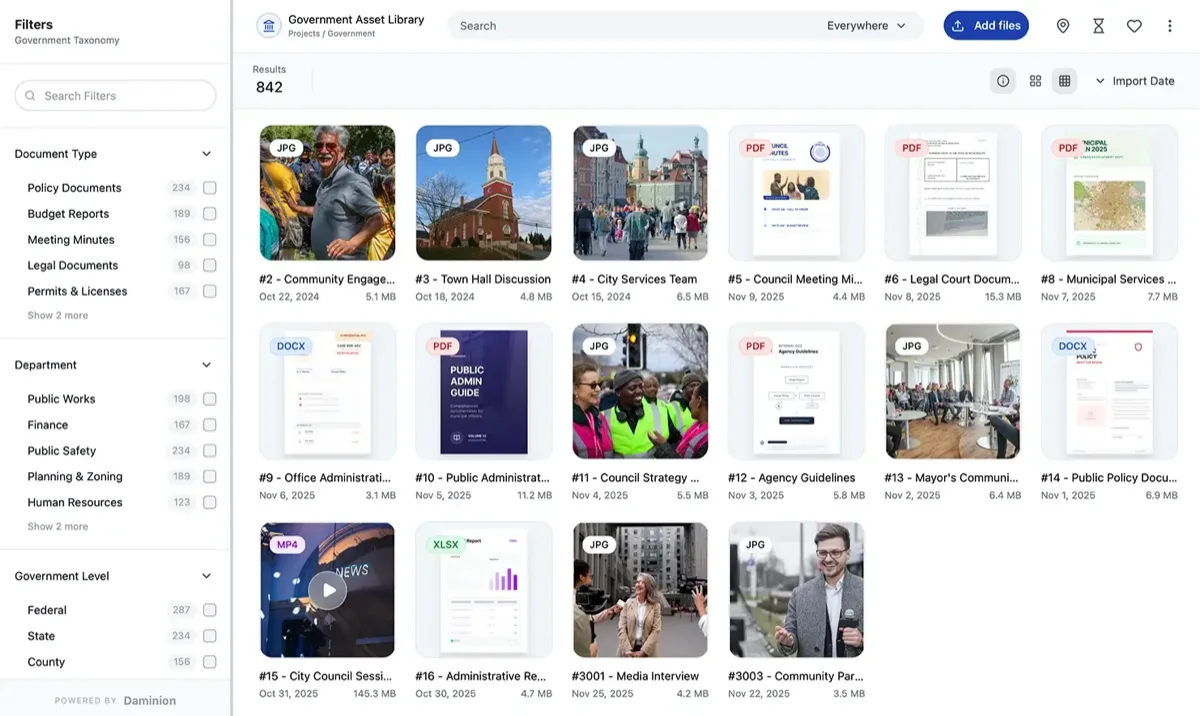
My test: install the server component on a local machine, then try to access the library from a completely separate network — no VPN, no port forwarding set up in advance — using only the vendor's web client. Daminion's web client reached the local server cleanly through its own remote-access layer. That's the actual hybrid promise: your data stays on infrastructure you control, but nobody has to be on the office network to use it.
Quick comparison
| Tool | Hybrid model | Data location | Tier | Score |
|---|---|---|---|---|
| 1. Daminion | Self-hosted server + web client for remote access | Your own server/storage | $ | 9.0 |
| 2. Pics.io | Vendor-hosted interface over your own Google Drive storage | Your Google Drive | $$ | 8.3 |
| 3. Portfolio DAM | Legacy on-prem tool adding cloud access post-rebrand | Your own server, with newer cloud options | $$$ | 7.8 |
Price tiers: $ budget · $$ mid-range · $$$ enterprise, quote-based. Scores reflect hybrid-deployment fit for this ranking, not each tool's overall PhotoLib score. Checked July 2026.
1. Daminion — the clearest hybrid architecture we tested
Daminion
★★★★★ 4.8Best for: teams who want their data on their own storage, but browser-based access from anywhere without a VPN.
Pros
- Server and data stay on infrastructure you control, with a dedicated web client for remote access
- No VPN or manual port forwarding required to access the library from outside the office
- Priced per image rather than per seat, keeping the model affordable as remote access scales
Cons
- Server component requires Windows (a modest VM works)
- Initial server setup takes more effort than a pure-cloud signup
Our verdict: If the goal is genuinely "our data, our storage, but anyone can reach it from anywhere," Daminion's architecture is built for exactly that, not adapted onto it after the fact. Full test in our Daminion review.
2. Pics.io — your storage, vendor-hosted interface
Pics.io
★★★★★ 4.3Best for: teams that want their files in storage they already control (Google Drive) without running any server themselves.
Pros
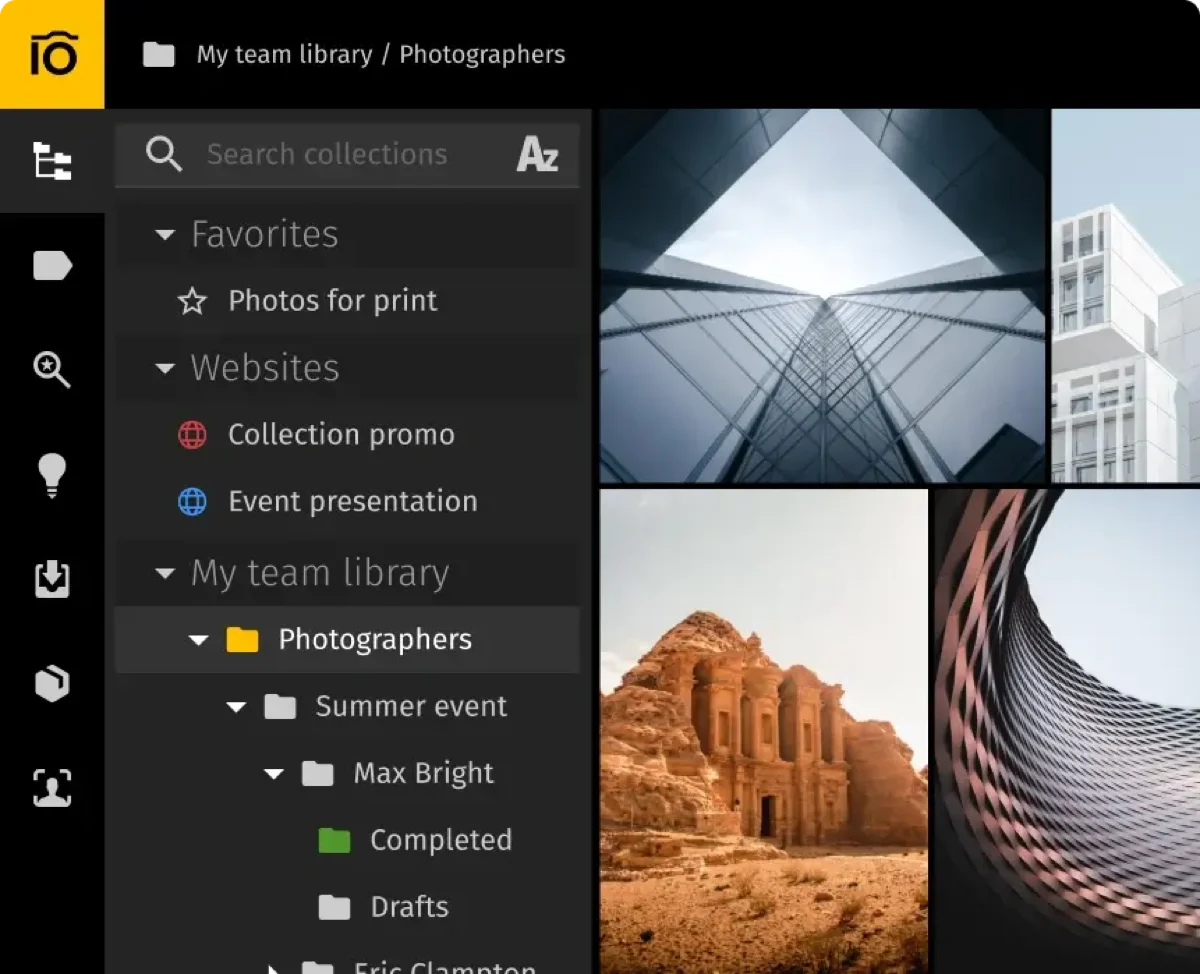
- Files live in your own Google Drive, not a proprietary vendor silo — genuinely your storage
- No server to install or maintain; the DAM interface itself is fully hosted
- Drive's own revision history and access controls carry over automatically
Cons
- Reliability and permission granularity are really Google Drive's, not DAM-specific features
- Only makes sense if you're already committed to Google Workspace
Our verdict: Pics.io is the hybrid model for teams who want to own the storage without owning a server — a genuinely different tradeoff than Daminion's self-hosted approach, not a worse version of it. Full test in our Pics.io review.
3. Portfolio DAM — a legacy on-prem tool adding cloud access
Portfolio DAM — 7.8. Formerly Extensis Portfolio, Portfolio DAM comes from a long on-premise history and has been adding cloud-access options since its 2026 rebrand and spin-out. It's a reasonable option for an organization already invested in the platform and looking to add remote access incrementally, but it's not built hybrid-first the way Daminion is — the cloud layer is newer and less central to the product than its on-prem roots. We didn't have a real, current interface screenshot on file for this page (only a placeholder), so no figure is shown here rather than substituting one. See the full detail on its post-rebrand direction in our Daminion vs. Portfolio DAM comparison.
Cost and how to choose
Decide which side of "hybrid" actually matters to you. If owning the server and storage outright is the priority, with remote access as an add-on layer, Daminion's architecture is built for exactly that from the ground up. If the priority is keeping files in storage you already trust and manage (Google Drive) without running any server at all, Pics.io is the better fit. If you're already invested in Portfolio DAM's platform specifically, its newer cloud options may be enough without a full switch — but if you're choosing fresh, a purpose-built hybrid tool will likely serve you better than a legacy on-prem tool with cloud bolted on.
Buyer’s test: during a trial, try accessing the library from a device on a completely different network than the server — no VPN, no advance setup — using only the vendor's remote-access method. If that doesn't work cleanly, the tool isn't delivering a genuine hybrid experience, regardless of what its marketing page claims.
FAQ
What's the best hybrid DAM software?
Daminion is the clearest hybrid architecture we tested: a self-hosted server you control, paired with a dedicated web client for remote access with no VPN required. Pics.io offers a different hybrid model — your files stay in Google Drive storage you already own, while the DAM interface itself is fully vendor-hosted.
What does "hybrid" mean for a DAM's deployment model?
It means keeping some of the control benefits of on-premise deployment — your own storage, your backup schedule — while still providing web-based remote access without a VPN, unlike a purely on-premise setup that typically requires being on the office network to access the library.
When is a hybrid DAM better than pure cloud or pure on-premise?
When the archive is too big to move economically but the team isn’t in one place. Terabytes of masters are cheap to keep on storage you already own and slow and expensive to push into a vendor’s cloud — yet the people who need them are remote, freelance or external. A hybrid setup leaves the files where they are and puts the access layer online. The other common case is regulatory: if only some of your assets carry constraints on where they may be stored, hybrid lets you keep those on your own infrastructure while everything else is shared normally. If your archive is small and everyone already works in a browser, a pure cloud DAM is simpler; if nothing may ever leave the building, a pure on-premise DAM is honest about that.
Which DAM supports hybrid deployment?
Of the tools we tested for this page, three do — in two different shapes. Daminion runs a server you install on your own hardware, paired with a web client for remote access, so the masters and the catalog both stay on your infrastructure. Pics.io inverts it: your files stay in Google Drive storage you already own, while the DAM interface itself is vendor-hosted. Portfolio DAM comes from a long on-premise history and has been adding cloud-access options since its 2026 rebrand. Which shape fits depends mostly on whether you’d rather own the server or avoid running one.
Sources & references
- Daminion — vendor site, accessed July 2026.
- Pics.io — vendor site, accessed July 2026.
- Daminion vs. Portfolio DAM comparison — PhotoLib, accessed July 2026.
- PhotoLib test lab — June/July 2026, remote-access-without-VPN tests across three tools. See how we test.