Our verdict in 30 seconds: Canto (9.1) is the best day-to-day fit for a marketing team — natural-language search finds campaign assets fast, and non-technical staff pick it up quickly. Brandfolder (8.9) has the strongest analytics on which assets actually get downloaded and used, useful for justifying creative spend. Bynder (8.7) is the pick once brand consistency has to be enforced across multiple marketing sub-teams or regions. Filecamp (8.2) is the budget option for a small marketing team that doesn't need enterprise governance.
What a marketing team actually needs from a DAM
Most DAM buying guides are written around IT's checklist — security, integrations, storage limits. A marketing team's actual day-to-day friction is different: campaign assets scattered across a dozen people's laptops and Slack threads, brand guidelines that get quietly ignored because nobody can find the current logo file, and no visibility into whether a $30,000 hero shoot's assets are actually being used six months later. We tested these four tools against that specific set of problems, not a general enterprise-security checklist. If the brief is a shared photo library rather than campaign operations, our photo management for teams comparison is the closer list.
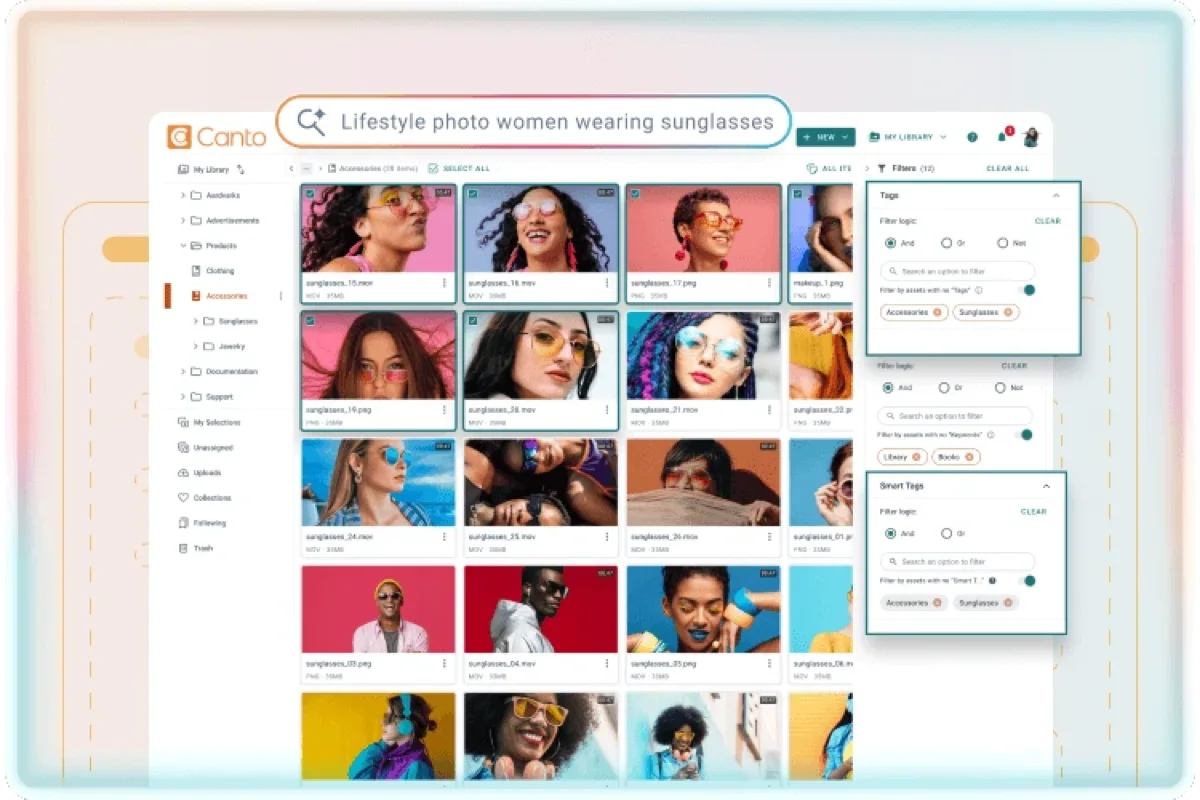
My test here is handing the tool to someone who isn't technical and isn't part of the DAM rollout — a marketing coordinator, not an IT admin — and timing how long it takes them to find "the approved hero image for the spring campaign" using only a plain description. Canto's natural-language search did this in under 20 seconds with zero prior keywording. That's the actual bar for a marketing team's tool: can the person who isn't a power user still find things fast.
Quick comparison
| Tool | Marketing-team strength | Best for | Tier | Score |
|---|---|---|---|---|
| 1. Canto | Natural-language search, fast onboarding for non-technical staff | Day-to-day campaign asset finding | $$ | 9.1 |
| 2. Brandfolder | Usage analytics per asset & campaign | Proving which creative gets used | $$ | 8.9 |
| 3. Bynder | Brand guideline enforcement across sub-teams/regions | Multi-team or multi-region marketing orgs | $$$ | 8.7 |
| 4. Filecamp | Simple campaign folders, budget-friendly | Small marketing teams, tight budget | $ | 8.2 |
Price tiers: $ budget · $$ mid-range · $$$ enterprise, quote-based. Scores reflect fit for marketing-team workflows specifically, not each tool's overall PhotoLib score. Checked July 2026.
1. Canto — fastest for non-technical marketing staff
Canto
★★★★★ 4.6Best for: marketing teams where most users aren't technical and need to find campaign assets by describing them, not by remembering exact tags.
Pros
- Natural-language search means a coordinator can find assets without learning a tagging system first
- Fast to roll out; non-technical staff need minimal training
- Shareable collections make it easy to hand agencies or freelancers exactly the campaign folder they need
Cons
- Less granular brand-guideline enforcement than Bynder for large, multi-region teams
- Mid-range pricing that climbs with added seats
Our verdict: For the everyday job of "find me the right campaign asset, fast, without a training session," Canto is the tool that gets a non-technical marketing team productive quickest. Full test in our Canto review.
2. Brandfolder — best usage analytics for proving creative ROI
Brandfolder
★★★★★ 4.5Best for: marketing leads who need to show which creative assets are actually being downloaded and used, not just stored.
Pros
- Per-asset and per-campaign download/usage analytics, useful for justifying creative production spend
- Clean, marketing-friendly interface for organizing by campaign
- Solid external sharing for agency and freelancer handoffs
Cons
- Search isn't as forgiving as Canto's natural-language search for untagged assets
- Mid-range pricing, quote-based at higher tiers
Our verdict: If your marketing leadership keeps asking "is this campaign's creative actually getting used," Brandfolder is the tool built to answer that question with real numbers, not a guess. Full test in our Brandfolder review.
Brand governance and the budget pick
Two more, at opposite ends: one for when brand consistency has to survive several sub-teams, one for when the whole requirement is campaign folders and sharing.
3. Bynder — 8.7: enforcing one brand across many teams
Once a marketing org grows past a single team — regional offices, multiple product lines, or an in-house team plus outside agencies all touching the same brand — someone has to enforce that everyone's using the current logo, the approved color codes, and the right campaign templates. Bynder's branded guideline pages and granular permissions are built for exactly that enforcement job. It's more structure than a single small marketing team needs, but it's the right tool once brand consistency has to survive multiple sub-teams working in parallel. Best for: multi-team or multi-region marketing orgs. See it in our brand portal software ranking.
4. Filecamp — 8.2: campaign folders without enterprise pricing
The budget option: simple campaign folders, straightforward sharing with agencies and freelancers, at a fraction of the other three tools' pricing. It won't give you Brandfolder's analytics or Bynder's multi-team guideline enforcement, but for a small marketing team that mainly needs "organize assets by campaign and hand the right folder to whoever needs it," it does that job well without enterprise pricing. Best for: a small team whose job really is folders and handoffs. See it in our DAM for small business ranking.
Marketing collateral management: the same job, another name
Marketing collateral is the finished, distributable output a marketing team hands to someone else — brochures and one-pagers, sales decks, social and ad creative, logo files, product shots. Almost all of it is digital marketing collateral now: the brochure is a PDF, the leave-behind is a link. That's why it lives in a DAM rather than a stockroom — and why marketing collateral management (MCM) is really this page's category described from the output's side rather than the library's. Tools sold as MCM are, with few exceptions, digital asset management with the marketing team named on the box.
The distinction buyers actually ask about is assets versus collateral. Assets are the raw ingredients: the untouched shoot, the logo in every format, a block of approved copy. Collateral is what you build from them and send — one hero photo is an asset, the spring-campaign one-pager it appears in is collateral. A DAM stores both, but they behave differently: assets mostly need finding, while collateral needs a lifecycle — which version is current, who signed it off, and when it stops being true.
That lifecycle is why collateral pushes a marketing team toward features a personal photo library never needs: version control, so there's one current file instead of final_v3_REALfinal.pdf; approval workflows, so nothing goes out unreviewed; and expiry dates, so a rep can't attach last year's pricing sheet to a live deal. A brand portal is the front door to that discipline. Collateral creation itself mostly happens in Figma or InDesign; the DAM owns either side of it — the approved ingredients in, the current finished piece out.
Cost and how to choose
Start with team size and structure, not feature checklists. A single marketing team of five to fifteen people mostly needs fast search and easy campaign organization — Canto fits that directly, and Filecamp is the budget version of the same idea. Once you're coordinating brand consistency across multiple teams, regions, or outside agencies, the real requirement becomes governance — Bynder's guideline enforcement earns its higher price there. If leadership specifically wants proof of which creative gets used (to justify a photo shoot budget or a campaign spend), weight Brandfolder's analytics into the decision over the others. None of the four are prohibitively expensive at the entry tier, but seat-based pricing on Canto and Bynder climbs as your team and its outside collaborators grow — ask specifically how guest/agency seats are counted before signing.
Buyer’s test: before buying, hand the tool to the least technical person on your marketing team and time how long it takes them to find one specific asset using only a plain description, with no training. If it takes more than a minute, expect adoption to stall once the DAM rollout excitement wears off.
FAQ
What's the best DAM software for a marketing team?
Canto is the best day-to-day fit for most marketing teams because its natural-language search lets non-technical staff find campaign assets quickly without learning a tagging system. Brandfolder is the better pick if usage analytics (proving which creative actually gets used) matters more than search speed, and Bynder is worth its higher price once brand consistency has to be enforced across multiple marketing sub-teams or regions.
Do marketing teams need a different DAM than IT or creative production teams?
Not a different tool necessarily, but a different priority. Marketing teams generally weight fast, forgiving search and easy campaign organization above deep security or workflow-automation features that matter more to IT or production teams. The four tools here can all serve broader teams too, but we ranked them specifically on marketing-team fit: findability, brand consistency, and usage visibility.
What is marketing collateral?
Marketing collateral is the finished material a marketing team produces for someone else to use or receive — brochures and one-pagers, sales decks, case studies, social and ad creative, logo files, product shots, event graphics. The common thread is that it is distributable: it leaves the team and lands in front of a customer, a prospect or a partner. That is what separates collateral from a raw asset, and it is why collateral needs version control and sign-off in a way a private image library never does.
What's the difference between marketing assets and collateral?
Assets are the raw ingredients; collateral is the finished piece you distribute. The untouched photo from a shoot, the logo in every file format, a stock clip, a block of approved copy — those are assets. The spring-campaign one-pager that combines them is collateral. A DAM holds both, but they behave differently: assets mostly need to be findable, while collateral needs a current version, an approval behind it and often an expiry date, so nobody sends out material that is no longer true.
What's the best marketing collateral management software?
Marketing collateral management is digital asset management described from the marketing team's side, so the shortlist is the same one on this page. Canto is the best day-to-day fit for most teams, because non-technical staff can find collateral by describing it rather than recalling tags. Brandfolder is the pick if you need to show which collateral actually gets downloaded and used. Bynder earns its higher price once approved collateral has to stay consistent across sub-teams, regions or outside agencies. Filecamp is the budget option for a small marketing team that does not need enterprise governance.
Sources & references
- Canto — vendor site, accessed July 2026.
- Brandfolder — vendor site, accessed July 2026.
- Bynder — vendor site, accessed July 2026.
- Filecamp — vendor site, accessed July 2026.
- PhotoLib test lab — June/July 2026, non-technical-user search timing test and campaign-organization review across four tools. See how we test.